Best Obd Scanner for All Cars: Top Picks and Buyer Guide
Choosing the right OBD scanner can save time, money, and frustration. This article highlights five reliable options that cover a wide range of vehicles and user needs—from casual drivers to DIY enthusiasts and professional mechanics. Each entry includes essential features, real-world applicability, and a concise buying guide to help you decide which scanner best fits your car and budget.
| Product | Brand | Key Features |
|---|---|---|
| ANCEL AD310 Classic Enhanced Universal OBD II Scanner | ANCEL | Reads/Clears codes, live data, freeze frame, I/M readiness, compact design |
| BlueDriver Bluetooth Pro OBDII Scan Tool | BlueDriver | Code reading/clearing, ABS/SRS/TPMS diagnostics, real-time data, repair reports |
| LAUNCH CRP123X Elite | LAUNCH | 2025 resets, AutoAuth lifetime updates, broad vehicle coverage, multi-system diagnosis |
| FOXWELL NT604 Elite | FOXWELL | 5-in-1 diagnostic: ABS, SRS, transmission, engine, live data |
| ZMOON ZM201 Professional OBD2 Scanner | Zmoon | 35,901 DTCs, live data with graphing, VIN retrieval, printing option |
Summary: The five options above balance wide vehicle coverage, ease of use, live data capabilities, and cost. ANCEL and LAUNCH cater to straightforward diagnostics with deep code libraries, BlueDriver emphasizes professional-grade insights with repair guidance, FOXWELL offers multi-system scanning for more thorough checks, and ZMOON combines extensive DTC coverage with data printing features for thorough documentation.
ANCEL AD310 Classic Enhanced Universal OBD II Scanner
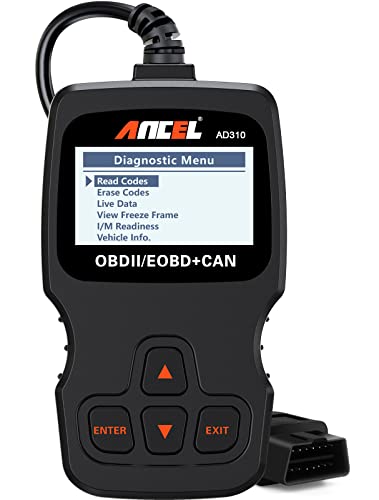
The ANCEL AD310 is a compact, budget-friendly OBD2 scanner designed for quick checks and routine maintenance. It reads and clears engine trouble codes, shows live data and freeze frame, and reports I/M readiness and vehicle information. Its durable build features a thick insulated 2.5-foot cable and a readable display, making it suitable for use in typical repair environments. The tool powers directly from the vehicle’s OBDII port, eliminating the need for batteries or external chargers. This model is widely used for fast CEL diagnosis and straightforward repairs.
BlueDriver Bluetooth Pro OBDII Scan Tool
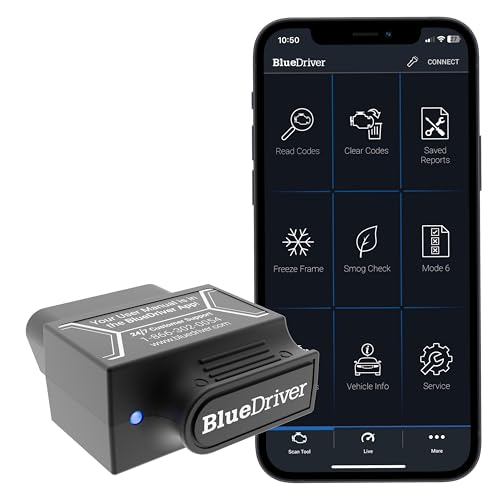
BlueDriver delivers professional-grade diagnostics via a Bluetooth connection to iPhone or Android devices. It reads and clears trouble codes and extends capabilities to ABS, SRS, Airbag, and TPMS codes, with real-time data and unlimited repair reports that suggest possible causes and fixes. This tool is subscription-free and relies on a robust cloud-backed data library, making it a preferred choice for enthusiasts who want deeper insights without a trip to the shop. It excels at ongoing monitoring and repair planning.
LAUNCH CRP123X Elite

The CRP123X Elite emphasizes wide compatibility and ongoing software support. It includes 2025-wide reset capabilities such as throttle adaptation, oil reset, SAS reset, BMS reset, and DPF regeneration, alongside standard OBD2 diagnostics. AutoAuth enables lifetime updates, ensuring compatibility with a broad range of 1996–2025 vehicles, including FCA SGW-equipped models. It’s designed to deliver precise data rapidly and assist users in diagnosing issues across multiple car systems, promoting faster, more confident DIY maintenance.
ANCEL AD410 Enhanced OBD2 Scanner

The AD410 is an engine-focused OBDII scanner with broad compatibility across 1996+ vehicles and multiple protocols, including CAN. It provides quick fault code reading and clearing, MIL readiness checks, and EVAP/O2 sensor testing, with a comprehensive DTC library. Note that it does not support advanced functions for ABS or SRS; its strength is quick engine diagnostics and general vehicle health checks, making it a practical choice for basic, on-the-go diagnostics and smog-related checks.
FOXWELL NT604 Elite

The FOXWELL NT604 Elite is a versatile 5-in-1 diagnostic tool that covers engine, ABS, SRS, and transmission systems, plus live data streaming and data playback. It’s designed for owners who want quick, out-of-the-box diagnostics with a modern interface and a clear display. The 2025 version comes pre-loaded with software and supports I/M readiness, code reading/clearing, and real-time data analysis. It’s a solid choice for those who desire a broader, multi-system diagnostic workflow without a dealer visit.
ZMOON ZM201 Professional OBD2 Scanner

The ZMOON ZM201 emphasizes expansive DTC coverage with 35,901 built-in codes, live data with graphing, VIN retrieval, and printing capabilities. It’s positioned for users who want comprehensive diagnostic data and documentation options for repairs or shop records. The device supports connections to a computer for printing, offering a convenient way to archive fault data. Its robust DTC library makes it a strong option for more complex diagnostic needs across a wide range of vehicles manufactured after 1996.
Buying Guide: Key Purchase Considerations
- Vehicle coverage: If you own multiple cars or a modern fleet, prioritize tools with wide OBD-II protocol support and frequent updates (for 1996–2025+ models).
- Systems supported: Decide if you need single-system (engine only) vs multi-system (ABS, SRS, transmission, etc.). Multi-system tools generally provide deeper diagnostics but may cost more.
- Data access: Real-time data, data logging, and the ability to view live graphs help identify intermittent issues. Check if the tool supports VIN, I/M readiness, and freeze frame data.
- Ease of use: For beginners, a straightforward interface, clear code definitions, and out-of-the-box readiness are important. For professionals, programmable updates and printing capabilities add value.
- Update model: Some tools include lifetime or automatic updates, which ensures ongoing compatibility with new vehicles and emissions standards. Consider software update policies before purchase.
- Connectivity: Bluetooth/Wi-Fi scanners paired with a mobile app offer flexibility. Wired handheld units can be more reliable in shop environments.
- Data export and printing: If you need records for repairs or resale, choose a scanner with data export and printing options or cloud-based repair reports.
- Power source: Most devices draw power from the vehicle; some may require no battery or external charger. Confirm compatibility with your typical diagnostic workflow.
- Printer compatibility: If you plan to print fault data, ensure the device supports direct printing or has compatible PC software.
Across these options, select a scanner that aligns with your primary use case—quick code reads and fixes, multi-system diagnostics for ongoing maintenance, or formal documentation for professional repair jobs. Always verify vehicle compatibility with your specific make, model, and year, especially for FCA SGW-equipped vehicles and non-U.S. market models where applicable.