Best Flip Down Car Monitors for Every Vehicle
Finding the right flip-down monitor for a car can elevate in-vehicle entertainment, from longer road trips to rides with passengers. This guide highlights five top options that balance screen size, resolution, and smart features. Each product is designed for easy installation, clear viewing, and reliable playback across common formats. Use the quick table below to compare core specs at a glance.
| Product | Screen Size | Key Benefit |
|---|---|---|
| XTRONS 14 Inch Overhead Player | 14″ | HD display with built-in speakers and 1080p support |
| XTRONS 17.3 Inch Motorized Overhead | 17.3″ | Large viewing area for coaches and buses |
| XTRONS 10.2 Inch Overhead | 10.2″ | Compact option with 1080p video support |
| XTRONS Android 11.6 Inch Overhead | 11.6″ | Android OS with app access and screen mirroring |
| XTRONS 15.6 Inch Motorized Overhead | 15.6″ | HD IPS panel with auto-flip and Android ability |
Across these selections, you’ll find common strengths: wide viewing angles, robust HD resolutions, multiple input options, and easy folding mechanisms. The best choice depends on vehicle size, distance from the screen to riders, and whether you value built-in smart features or straightforward video playback. The following sections provide detailed product perspectives to help you compare real-world performance.
XTRONS 14 Inch Overhead Player

The XTRONS 14 Inch digital HD screen is designed for cars, SUVs, and commercial vehicles. Its 1366×768 resolution delivers a clearer image for passengers, with support for 1080p video playback to reduce lag or stutter during movies or video content. Built-in stereo speakers provide in-vehicle sound without external gear, and Bluetooth audio transmission adds convenience for wireless listening. Compatible formats include AVI, MP4, and JPG, ensuring broad media compatibility for mixed content on trips.
XTRONS 17.3 Inch Motorized Overhead

The 17.3-inch motorized overhead monitor is designed for larger vehicles such as coaches and buses. It offers a wide open angle of up to 130°, improving passenger visibility from multiple seating positions. With HDMI, USB, and SD inputs, it supports diverse media sources, expanding entertainment options for front-to-back seating arrangements. The IPS screen provides sharp, consistent color and a broad viewing experience during travel.
XTRONS 10.2 Inch Overhead

The 10.2-inch HD screen is a compact option for smaller cars while still providing 1280×720 resolution. Like larger models, it supports 1080p video formats and includes built-in stereo speakers for clear in-vehicle audio. Its smaller footprint makes installation easier in tight spaces, without sacrificing essential connectivity such as HDMI and USB inputs for versatile media playback on the go.
XTRONS Android 11.6 Inch Overhead

This model marks the first Android flip-down option in its class, powered by a quad-core CPU and 1GB RAM with 16GB ROM. It connects to WiFi or a mobile hotspot, enabling streaming from Netflix, YouTube, Prime Video, and more. The 11.6-inch IPS screen supports screen mirroring, HDMI, USB, and AV inputs, allowing diverse media sharing from mobile devices or cameras to maximize passenger entertainment during trips.
XTRONS 15.6 Inch Motorized Overhead
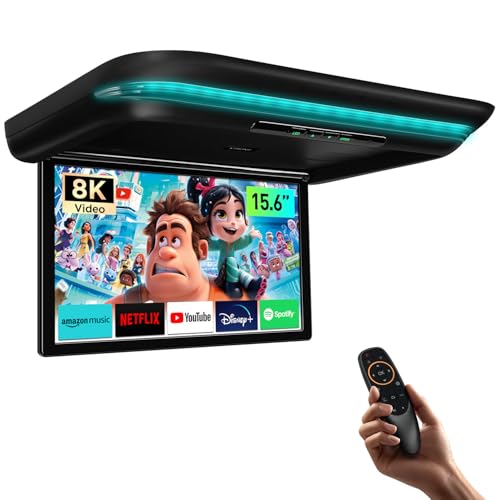
The 15.6-inch motorized overhead monitor combines an 8K-capable Android platform with an IPS LCD and HDR 10+ visuals. It offers built-in stereo speakers and supports HDMI, USB, and Bluetooth connections. The electric flip-down mechanism simplifies operation from both the front seat and rear seats, providing a luxurious, hands-free way to control the screen while on the road.
Buying Guide: Key Considerations for Selecting a Flip-Down Car Monitor
- Vehicle size and seating: Choose screen size to fit the cabin. Larger screens improve viewing for multiple passengers, while compact models fit smaller cars or headroom-limited spaces.
- Display quality: Look for HD or Full HD resolution and IPS panels for stable color and wide viewing angles from different seats.
- Input options: Consider HDMI, USB, AV, SD, and Bluetooth capabilities to support a variety of media sources and devices.
- Smart features: Android-based models enable apps and streaming, but may require more power and cooling. Simpler models focus on video playback and built-in speakers.
- Installation and wiring: Some units require vehicle power integration or headliner access. Ensure compatibility with your roof mount and wiring harness.
- Audio options: Built-in speakers simplify setup; if you prefer external audio, verify compatibility with IR headphones or car stereo integration.
- Durability and heat: Car environments can get hot; verify the unit’s operating temperature range and fan design to avoid thermal throttling.
- Warranty and support: Check the manufacturer’s warranty terms and available customer support for automotive installation questions.
Across the selections, the best choice depends on your priorities: screen size, smart features, or a straightforward display for media playback. For frequent long trips with several passengers, consider larger, motorized Overhead models with HDMI and USB inputs. If you want access to streaming apps and phone mirroring, an Android-based option provides more versatility. Always verify mounting compatibility with your vehicle’s headliner and the seat layout to optimize comfort and viewing angles for every rider.