Best 13.3-Inch Car TV Headrest Monitors for Back Seats
The shift toward in-car entertainment has driven demand for reliable headrest monitors that enhance long trips and daily commutes. This guide highlights five top 13.3-inch options designed for easy setup, strong performance, and flexibility with wireless mirrors, apps, and HDMI devices. Each pick supports Android or Miracast/AirPlay connections, and many offer OTA updates for long-term value. Read on to compare features, screen quality, and streaming capabilities to find the right fit for your vehicle and passengers.
| Product | Brand | Key Benefit |
|---|---|---|
| 13.3″ Car TV for Back Seat (4K Android Headrest Monitor) | WONNIE | High-res IPS touchscreen with OTA apps |
| 13.3″ Car TV Headrest Monitor (4K Android Tablet) | WONNIE | Powerful Android experience with Miracast/AirPlay |
| 4-in-1 Wireless CarPlay/Android Auto & HDMI Car TV Mate Max | GETPAIRR | All-in-one wireless CarPlay/Auto with HDMI |
| 3-in-1 Wireless CarPlay Adapter & HDMI (Pro Max) | TeckyGem | Plug-and-play wireless CarPlay with HDMI input |
| Car TV Mate Max With Wireless CarPlay & Android Auto | Rocketek | Three-in-one streaming and wireless CarPlay |
WONNIE 13.3″ Android Headrest Car TV (4K, 64GB)

Product Overview: This 13.3-inch HD IPS Touchscreen delivers 1920×1200 resolution with 4K playback support. It uses a capable multimedia processor and built-in GPU to provide smooth performance and responsive touch controls for backseat passengers. The display is designed to function well on long trips or daily commutes, turning the rear cabin into an entertainment hub.
Key Features in Context: Android 13 with OTA updates ensures apps stay current and streaming from services like YouTube, Netflix, and Disney+ is straightforward over WiFi, mobile hotspot, or 5G networks. The device supports downloading apps via Google Play or APKPure, expanding entertainment choices beyond built-in content.
Connectivity and Control: Wireless Miracast/AirPlay compatibility lets passengers mirror content from Android or iOS devices. The included MyCar Link remote app adds convenient control from the rear seats. The combination of WiFi, HDMI/USB inputs, and a robust screen makes this a versatile headrest option for families and commuters alike.
WONNIE 13.3″ Car TV Headrest Monitor (Android 13, OTA Updates)

Product Overview: This model mirrors the prior WONNIE option with a 13.3-inch HD IPS touchscreen offering 1920×1200 resolution and 4K playback support. Its advanced multimedia processor and built-in GPU provide smooth navigation and sharp visuals, suitable for long drives and family entertainment setups.
Software and Connectivity: Android 13 with OTA updates supports YouTube, Netflix, Disney+, and more via 5G/2.4GHz WiFi or a mobile hotspot. App availability through Google Play helps tailor entertainment, while Miracast/AirPlay enable easy screen mirroring from smartphones or tablets for quick content sharing.
Remote and Usability: The MyCar Link remote app enhances control from the back seat, making it easier to adjust volume, switch inputs, or select apps while driving. The device integrates with HDMI/USB inputs for external streaming devices, game consoles, or media players, providing a flexible entertainment experience for back-seat passengers.
GETPAIRR 4-in-1 Car TV Mate Pro Max
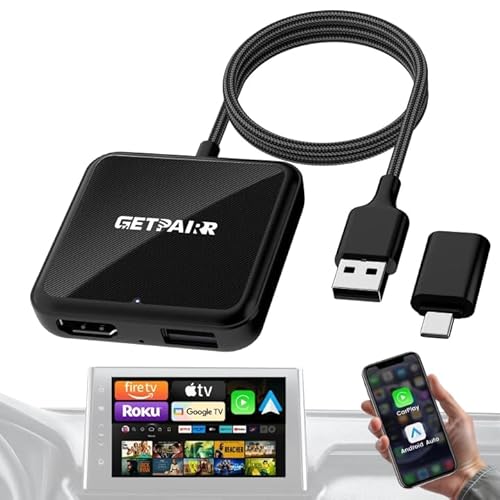
Product Overview: The Gen4 4-in-1 Car TV Mate Pro Max combines Wireless CarPlay, Android Auto, and HDMI input in a compact dongle. It supports fast auto-reconnect and reliable links, providing a plug-and-play path to use your car’s display for maps, music, calls, and voice control on the go.
Streaming and Casting: Using HDMI, this adapter converts a car screen into a TV-capable display for Fire TV Stick, Google TV, Apple TV, Roku, Switch, or other streaming devices. Content can reach up to 2K/60Hz with 1080p/60Hz being common, and a hotspot/Wi-Fi is required for online apps. Screen mirroring works with compatible devices, enabling wireless content on the car screen when paired with a WiFi network.
Usage Considerations: While it enables streaming via external devices, the car screen itself cannot directly control HDMI devices. It’s best for content players and apps on the external device, while navigation and phone functions remain handled by CarPlay/Android Auto on the phone side. This makes it a flexible option for road trips and family entertainment.
TeckyGem 3-in-1 Wireless CarPlay Adapter & HDMI

Product Overview: This compact 3-in-1 wireless CarPlay/Android Auto adapter blends wireless CarPlay with Android Auto and an HDMI input, enabling a seamless wireless upgrade for many factory head units. It’s designed for plug-and-play use and supports instant access to maps, music, calls, and voice assistants as you drive.
HDMI Streaming and External Devices: The HDMI port lets you connect a Fire TV Stick, set-top box, or other media devices to stream content directly on the car display. While the adapter handles screen mirroring and app access, you’ll need an external streaming device because built-in apps aren’t provided. This makes it ideal for road trips and family movie nights on the go.
Setup and Usability: The device emphasizes easy setup with minimal apps installation. Pairing to CarPlay or Android Auto on your phone enables a smooth transition between driver assistance and rear-seat entertainment, with stable Bluetooth/Wi-Fi connectivity powering the experience.
LAMTTO Car TV Mate Pro & Wireless CarPlay Adapter

Product Overview: This 2-in-1 device upgrades factory wired CarPlay to wireless and adds an HDMI option for external streaming devices. It aims to transform a car’s screen into a versatile entertainment hub, allowing seamless wireless CarPlay while also enabling external devices like Fire TV Stick or Nintendo Switch via HDMI.
Wireless CarPlay Experience: The adapter automatically connects as you enter the vehicle, providing convenient access to Siri navigation, calls, and messages. It’s designed to work with a variety of factory systems (note: not compatible with certain brands like BMW and Tesla). The focus is on turning a wired upgrade into a wireless, hands-free experience.
Rocketek Car TV Mate Max: 3-in-1 HDMI, CarPlay & Android Auto

Product Overview: The Rocketek Car TV Mate Max offers a three-in-one solution that combines HDMI streaming with wireless CarPlay and Android Auto. It works with a variety of streaming devices via HDMI and supports up to 2K/60Hz, with 1080p/60Hz as a common setting for in-car playback.
Features and Connectivity: The device enables wireless CarPlay/Android Auto, voice navigation, and control via steering wheel or touch input depending on the car. It supports content streaming from Netflix, YouTube, TikTok, and more when connected to compatible HDMI devices. It’s intended for road trips and family entertainment, delivering a theater-like experience on the move.
Buying Guide: Key Considerations For Buying A Car Headrest Monitor System
- Screen quality and size: A 13.3-inch panel with 1920×1200 resolution offers sharp images and good legibility from rear seats. Check for IPS panels and viewing angles to ensure consistent color and brightness for all passengers.
- Operating system and apps: Android-based units with OTA updates provide access to streaming apps and Play Store. Consider whether the device supports apps you already use and if updates are automatic for long-term support.
- Connectivity: Look for built-in WiFi or hotspot compatibility, Miracast/AirPlay support, and HDMI inputs for external streaming devices. A strong wireless connection reduces lag during streaming and mirroring.
- Ease of setup: Plug-and-play adapters that convert wired CarPlay/Android Auto to wireless are convenient but may require some basic configuration. Ensure the wiring, power, and USB/HDMI ports are accessible in your vehicle.
- Content accessibility: vs. built-in apps, external streaming devices (Fire TV Stick, Google TV, Apple TV) expand content options. Confirm compatibility with your preferred streaming services and file formats.
- Compatibility with vehicles: Some adapters are not compatible with certain car brands or OEM systems. Verify support for your car’s make and headrest mount design before purchase.
- Remote control and passenger usability: A dedicated remote app or Bluetooth control improves usability for back-seat passengers, especially while the vehicle is in motion.
- Safety and ergonomics: Ensure the installation does not obstruct view, airbags, or seating adjustments. Look for mounting options that minimize movement and secure cables neatly.