Best WiFi Extenders for Cars and Homes: Fast, Reliable Boosters for Any Space
Choosing the right WiFi extender can make or break your in-car connectivity and home network. This guide highlights five top options that balance speed, coverage, and security. Each product is designed to extend strong, stable signals to reach far corners of your vehicle or residence, supporting multiple devices and streaming needs. Below, you’ll find a quick summary table, followed by detailed product sections and a buying guide to help you pick the best fit for your setup.
| Product | Bandwidth (Max) | Coverage | Key Benefit |
|---|---|---|---|
| TP-Link AC1200 RE315 | 867 Mbps (5 GHz) / 300 Mbps (2.4 GHz) | Up to 1600 sq ft | Strong dual-band performance with solid device support |
| TP-Link RE550 AC1900 | 1300 Mbps (5 GHz) / 600 Mbps (2.4 GHz) | Up to 2100 sq ft | Excellent range and tri-antenna design for larger homes |
| Suirrsaze WiFi Extender | Up to 1.2 Gbps (5 GHz) / 300 Mbps (2.4 GHz) | Up to 12880 sq ft | 360° coverage with strong multi-wall performance |
| eero 6 Mesh Extender | Wi‑Fi 6 coverage | Up to 1500 sq ft per extender | Seamless mesh expansion with easy app setup |
| TP-Link RE715X AX1800 | 1201 Mbps (5 GHz) / 574 Mbps (2.4 GHz) | Up to 2100 sq ft | Wi-Fi 6 range extender with robust security |
TP-Link AC1200 WiFi Extender RE315

The RE315 is a compact dual-band extender that delivers a total bandwidth of 1.2 Gbps across 5 GHz and 2.4 GHz bands. It uses two external antennas to optimize coverage and reduce dead zones, supporting up to 32 devices. It integrates with EasyMesh for flexible network expansion and includes a single Ethernet port for wired devices, which can improve reliability for streaming sticks, gaming consoles, or a car’s in-cabin hotspot setup when used in a parked scenario. Built with a security-focused approach, TP-Link emphasizes design aligned with Secure-by-Design principles.
TP-Link AC1900 RE550 WiFi Range Extender

RE550 offers dual-band performance with 1300 Mbps on the 5 GHz band and 600 Mbps on the 2.4 GHz band, designed to maximize home coverage up to about 2100 square feet. Its three external antennas boost signal strength and reliability, which helps in larger homes or spaces with multiple walls. The device is EasyMesh compatible, enabling straightforward mesh networking with compatible TP-Link models. A wired Ethernet port helps connect game consoles, streaming boxes, or a car’s onboard WiFi extender when parked in a garage or driveway for boosted connectivity.
Suirrsaze 1.2Gbps WiFi Extender

This extender targets large coverage with up to 8,880 square feet and a dual-band setup that delivers 1.2 Gbps on the 5 GHz band plus 300 Mbps on the 2.4 GHz channel. Four external antennas and beamforming help maintain signal quality through walls and around obstacles, supporting 100+ devices in theory. It emphasizes a layered security stack—encryption, intrusion detection, and automatic device isolation—to deter network threats. Such features are beneficial for a car’s in-vehicle hotspot when parked or at a campsite with a temporary network extension.
eero 6 Mesh Extender
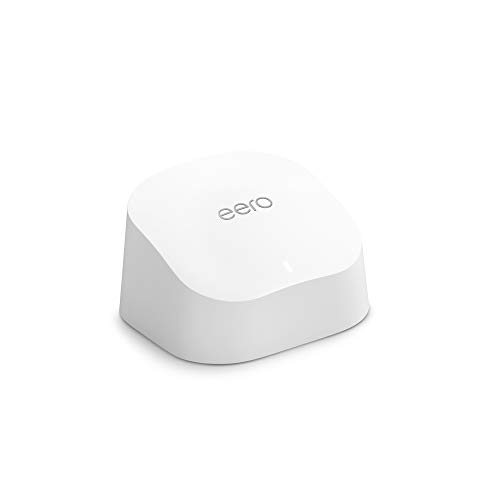
The eero 6 extender adds up to 1,500 square feet of Wi-Fi 6 coverage to an existing eero network. It’s designed for quick setup via the eero app and aims to simplify network management for homes with multiple devices. This option is ideal for households that already rely on eero mesh systems and want to extend coverage to a garage, driveway, or vehicle-based setup when parked. Free US-based support is available, with a focus on user-friendly network management and scalable expansion across rooms or yards.
TP-Link AX3000 RE715X WiFi 6 Extender
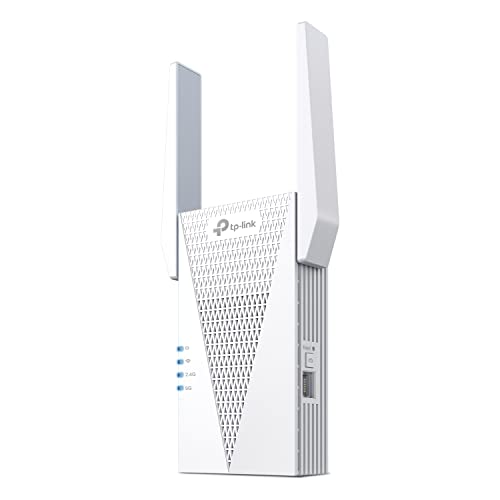
The RE715X is a WiFi 6 range extender that delivers up to 2404 Mbps on the 5 GHz band and 574 Mbps on the 2.4 GHz band, with support for EasyMesh. Four high-gain antennas with beamforming provide extensive coverage up to around 2100 square feet and strong performance for multiple devices. The device includes an Ethernet port for wired connections to network devices and is designed to complement a modern router setup, offering robust security features aligned with TP-Link’s Secure-by-Design approach.
Buying Guide: Key Purchase Considerations
When choosing a WiFi extender to support car and home connectivity, consider:
- Coverage Needs: Measure your space and select a model that can reach far corners, garages, and parked cars. Larger homes benefit from units with multiple antennas and higher maximum square footage.
- Speed and Bandwidth: Prioritize dual-band or WiFi 6/6E extenders for better overall throughput, especially if streaming in 4K or gaming in the car hotspot scenario.
- Mesh Compatibility: If you already own a mesh system, choose extenders that are EasyMesh-compatible or native to your brand to ensure seamless roaming and simple setup.
- Wired Ports: An Ethernet port is valuable for boosting stability of a car hotspot or in-car entertainment systems when parked, enabling a reliable wired link where WiFi alone struggles.
- Security Features: Look for encryption, firewall options, and vendor commitments to secure-by-design principles to protect your home and mobile networks.
- Setup and Management: Apps that guide installation and allow remote management help with quick deployments in a home or vehicle environment.
- Price-to-Performance: Compare real-world throughput, device density, and ease of use to determine which extender offers the best value for your use-case.
Across these options, you’ll find models that balance speed, range, and ease of use. For a parked vehicle’s temporary hotspot or a garage workspace, wired Ethernet capability and robust wall-penetration performance can be as important as peak throughput. For whole-home coverage, mesh-friendly extenders and WiFi 6 compatibility provide the most scalable, future-proof solution.