Best Laptop Stands for Truck Setups That Improve in-Cab Productivity
Finding a reliable laptop stand for a truck can turn long drives and fieldwork into more productive sessions. The right mount keeps your device secure, reduces strain, and ensures easy access while you’re on the road. Below is a curated selection of sturdy, no‑drill, and adjustable truck laptop mounts designed for trucks, vans, and SUVs. Each option prioritizes stability, cooling, and flexible positioning to match varied driving conditions and work styles.
| Product | Brand | Key Benefit |
|---|---|---|
| VIVO Single Laptop Car Mount | VIVO | Full articulation and vehicle-specific mounting feet |
| MELIPRON Vehicle Laptop Mount | MELIPRON | No‑drill installation with quick-release telescopic pole |
| SPIRRELAB Truck Laptop Mount (Chevrolet) | SPIRRELAB | Built‑in cooling fan and 3+5 fixation for stability |
| SPIRRELAB Ford Truck Laptop Mount | SPIRRELAB | Fits broad Ford truck lines with dual cooling fans |
| MELIPRON Ford F‑Series Laptop Mount | MELIPRON | Two built‑in fans with no‑drill installation |
VIVO Single Laptop Car Mount For Trucks
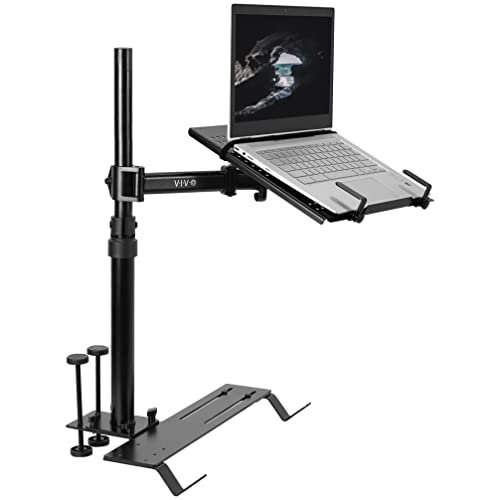
The VIVO MOUNT-CAR01 is designed for vehicles with exposed floor seat bolts, offering three mounting feet for wide compatibility in trucks, vans, cars, and SUVs. Its heavy‑duty base anchors to seat bolts at 0°, 90°, and 45° angles to provide a stable workstation. The 36cm x 30cm tray accommodates laptops, notebooks, and tablets up to 43cm and 5kg, with a ventilated surface to improve device cooling. Flexible tray clips secure devices and allow quick release for on‑the‑go use. The full articulation includes tilt, swivel, rotation, and a telescoping pole adjustable from 47cm to 67cm, with 23cm of arm adjustment at the highest setting.
MELIPRON Vehicle Laptop Mount For Trucks & Vans

This MELIPRON model emphasizes ergonomic adjustability with height, tilt, and 360° rotation, enabling optimal viewing angles and reduced neck or shoulder strain. Installation is drill-free, mounting directly to passenger seat rail bolts, which preserves the vehicle’s structure and is ideal for fleets or personal vehicles. A quick-release telescopic pole allows easy removal when not in use to maintain passenger space in shared vehicles or occasional deployments.
SPIRRELAB Truck Laptop Mount For 19-25 Inch Chevy Silverado & More

Designed for broad compatibility with Chevrolet Silverado, Tahoe, GMC Sierra, and similar models, this SPIRRELAB mount fits laptops from 19 to 25 inches. No drilling is required, and the base anchors to a passenger seat bolt. A 1.5″ ball joint and solid base deliver stability on rough roads, while three locking joints and a 20″ reach provide flexible positioning from 11.9″ to 20″ in height. A built‑in cooling fan helps dissipate heat, protecting devices during extended use.
SPIRRELAB Ford Truck Laptop Mount For F‑Series

This SPIRRELAB model targets Ford F‑Series trucks (F‑150, F‑250, F‑350, F‑550) and similar Ford fleets. It supports laptops from 10.6″ to 17″ with a two‑fan cooling system. The base uses a no‑drill mounting approach; a three‑plus‑five fixation scheme helps reduce laptop wobble on rough roads. Aircraft‑grade aluminum and alloy steel ensure durability while maintaining a lighter overall weight than some rugged competitors.
MELIPRON Ford F‑Series No‑Drill Laptop Stand

Targeting Ford F‑Series models, this MELIPRON mount fits 2015–2025 F‑150 and newer F‑250, F‑350, and F‑550 trucks, along with related vehicles. No drilling is required; the base brackets mount to passenger seat track rails for stable use. It offers adjustable height, a 360° rotatable tray, and dual swing arms for extended reach. Two built‑in cooling fans actively prevent overheating, supporting laptop longevity during long drives or demanding work sessions.
Buying Guide: Key Considerations For Truck Laptop Stands
- Vehicle compatibility: Look for models that specify your truck, van, or SUV type and seating bolt patterns. Some mounts offer multiple feet or bolt configurations to fit various vehicles.
- No‑drill installation: If preserving vehicle integrity matters, prioritize no‑drill bases mounted to seat rails or bolts. Check if removal is straightforward for passenger space when needed.
- Adjustability and reach: Consider height ranges, tilt, swivel, and 180°/360° rotation to achieve ergonomic viewing angles. Longer reach helps when the passenger seat is used for work only sometimes.
- Laptop size compatibility: Confirm the tray size and weight limit match your device, particularly if you use larger notebooks or tablets. A ventilated surface can aid cooling for high‑powered laptops.
- Cooling features: Built‑in fans or high airflow trays help manage heat, which protects hardware during heavy use in warm cabin environments.
- Durability vs. weight: Aluminum and steel builds provide strength for rough road conditions, but consider the overall weight and ease of installation/removal.
- Security and stability: Look for locking clamps or adjustable straps to minimize movement on bumpy roads. A stable base distributes weight to reduce tipping risk.
- Installation speed and maintenance: Quick‑release poles and modular joints can save time, especially if the vehicle is shared or reconfigured often.
Usage Scenarios And Comparative Perspectives
For long-haul drivers, a high reach and full articulation help keep the screen at eye level while maintaining comfortable seating positions. In fleet vehicles used by multiple drivers, quick removal and reinstallation minimize downtime and preserve interior space. No‑drill options are particularly appealing to owners who want to avoid altering the vehicle’s structure, while models with built‑in cooling fans offer an extra safeguard for laptops during extended trips in hot weather.
When evaluating options, consider the balance between maximum compatibility and specialized features. Some mounts excel with specific brands or Ford/GM vehicles, offering robust stability for those platforms. Others provide universal fits with broader size support and enhanced airflow. The best choice depends on your truck model, typical device sizes, and whether you prioritize ease of installation over absolute rigidity.
For users who need to work from the passenger seat occasionally, models with quick‑disconnect poles and lightweight bases can simplify transitions between driving and working modes. If you require heavy use on rough terrain, prioritize mounts with stronger bases and more extensive reach to accommodate different seating positions and ergonomic angles.
In all cases, verify the listed weight capacity and ensure the tray’s dimensions accommodate your laptop or tablet. Check customer reviews for real‑world feedback on stability during highway speeds and off‑road conditions to ensure the chosen model meets your daily workflow requirements.