Best OBD1 Scan Tool Solutions for GM and Ford Vehicles
People working on classic GM and Ford vehicles rely on reliable OBD1 scan tools to read ECM and ABS codes, verify repairs, and diagnose issues quickly. This guide highlights five top options that balance compatibility, ease of use, and practical features. Each tool is evaluated on how well it interfaces with 1981–1995 GM and Ford-era systems, including EEC-IV and MCU-based controllers, so you can make an informed choice for your repair bench.
| Product | Brand | Model Years | Key Benefit |
|---|---|---|---|
| JOPLAY GM OBD1 Scanner | Joplay | 1982–1995 | Safer, multilingual guidance and rapid ECU/ABS readings |
| INNOVA 3145 Ford Digital OBD1 Code Reader | Innova | 1982–1995 (Ford family) | Clear digital display for codes and definitions |
| JOPLAY Ford OBD1 2-in-1 Code Reader | Joplay | 1981–1995 | Two-in-one design with KOEO/KOER tests |
| INNOVA 3123 GM OBD1 Code Reader | Innova | 1982–1995 | ECM/ABS code access for GM vehicles |
| JOPLAY GM OBD1 Scanner (Blue) | Joplay | 1982–1995 | Clear, concise troubleshooting guidance |
JOPLAY GM OBD1 Scanner (1982–1995)
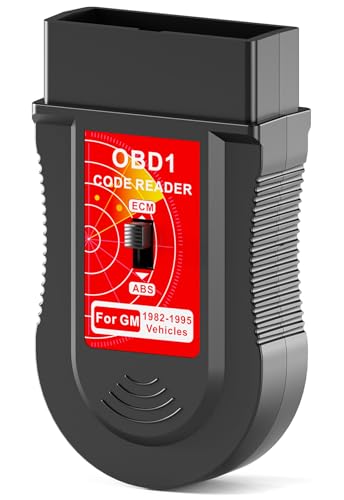
The JOPLAY GM OBD1 scanner is designed for General Motors and Saturn models from 1982 to 1995. It emphasizes safety by avoiding DIY jumper wires and uses a professional connector to prevent short circuits. It provides dashboard indicator lights to aid code counting and includes a handbook to locate problems quickly. The device reads ECM and ABS codes without harming the vehicle’s computer system and is suitable for a range of GM-era vehicles, with noted exclusions for certain non-GM models. Easy plug-in to the self-test connector is a key feature.
INNOVA 3145 Ford Digital OBD1 Code Reader
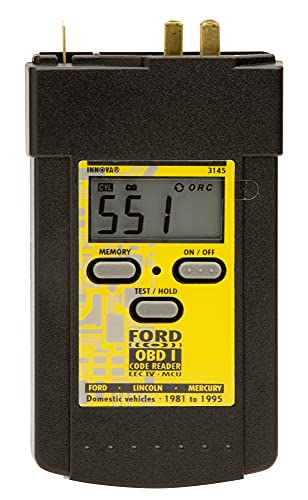
The INNOVA 3145 offers a digital display that shows numeric trouble codes and their meanings, removing the need to interpret blinking lights. It targets Ford, Lincoln, and Mercury vehicles from 1982 to 1995 and is compatible with MCU and EEC-IV systems. The absence of ABS-specific data is notable, but for many Ford-family diagnostics, this unit provides fast, readable outputs and straightforward operation for on-the-spot troubleshooting.
JOPLAY OBD1 Code Reader For Ford (2-in-1)

This JOPLAY device provides wide Ford, Lincoln, and Mercury compatibility from 1981 to 1995. It interfaces with EEC-IV and MCU-based systems and includes a 2.4″ LCD that displays code numbers and definitions to replace traditional LED or blinking light methods. The tool supports KOEO, CM, and KOER self-tests, offering a compact, user-friendly diagnostic experience for Ford-era vehicles and a straightforward plug-and-play setup.
JOPLAY GM OBD1 Scanner Blue
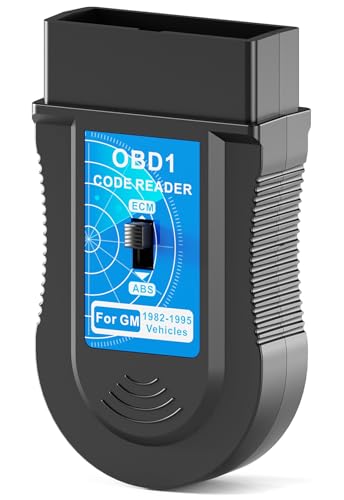
Similar in function to other GM-focused units, this blue variant emphasizes safe, reliable ECM and ABS code reading for GM and Saturn vehicles from 1982 to 1995. It uses a standard self-test connector, and its design aligns with the recognizable JOPLAY approach: clear problem identification, avoidance of risky connectors, and a practical carrier for technicians who regularly service older GM platforms. The included language options and easy-to-follow prompts support multilingual users accessing maintenance information.
KITUREK OBD1 to OBD2 Adapter

The KITUREK adapter facilitates bridging OBD1 and OBD2 systems with a 12-pin to 16-pin interface, allowing older scanners to connect to newer diagnostic ports. Made from durable PVC with a copper core, the cable is designed for reliability and long service life. It is designed for broad vehicle applicability and highlights the importance of plug-and-play installation for efficient diagnostics when working with mixed-era fleets.
Hirificing OBD1 to OBD2 GM Adapter

This GM adapter focuses on providing a reliable extension between OBD1 and OBD2 interfaces. It is a cable rather than a scanner, designed to connect scanners and vehicles for GM models that use older 12-pin sockets. The product emphasizes durability, compatibility, and ease of use, with the capability to daisy-chain multiple cables for extended reach during diagnostics.
Buying Guide
- Vehicle compatibility: Confirm that the tool supports GM or Ford models from 1981–1995. Note any exclusions noted by the manufacturer (diesel, certain makes, or non-GM brands).
- Interface and readability: Look for tools with digital displays or multilingual instructions that translate codes into definitions, reducing guesswork.
- Self-test features: KOEO, KOER, and CM tests help verify ignition, memory, and running conditions. Tools with these tests offer deeper diagnostic insights.
- Safety and compatibility: Choose tools that use professional connectors and avoid DIY jumpers to protect the vehicle’s ECU from short circuits.
- Expansion options: OBD1 to OBD2 adapters increase versatility when dealing with mixed-era fleets or vehicles that share components across years.
- Documentation and language support: Multilingual manuals or on-tool help can speed up troubleshooting for non-English speakers.
- Build quality and cable management: Durable cables and robust housings reduce wear, especially when working on older vehicles in tight engine bays.
- Price and availability of replacement parts: Consider tools with widely available replacement cables or adapters to extend lifespan.