Best Car Headrest Monitors for Backseat Entertainment on Road Trips
Discover top headrest monitors designed to turn any car ride into a personal cinema. This guide highlights five models with large screens, smart features, and easy connectivity to phones and streaming services. From Android-powered systems to wireless mirror options, these headrest TVs are built to keep kids and passengers engaged on long journeys while offering parents safer, in-seat viewing control. Browse options that prioritize compatibility with various vehicle models, ease of installation, and robust media playback in 1080p and 4K where available.
| Product | Brand | Screen Size | Highlights |
|---|---|---|---|
| AINAVITO 13.5″ Android 13 Car Headrest Monitor | AINAVITO | 13.5″ | 4K decoding, AirPlay/Miracast, Android 13, 4G+64G |
| Seventour 14″ Android Car TV Headrest Monitor | Seventour | 14″ | Android 13, 14″ IPS touch, 5G/2.4G WiFi, dual device support |
| Seventour 15.6″ Android Car TV Headrest Monitor | Seventour | 15.6″ | Android 11/13 variants, wireless mirroring, robust mounting |
| AOWINHIT 7″ Dual Headrest Monitors | AOWINHIT | 7″ | Dual displays, infrared, quick install |
| Bsldtor 10.1″ Android Car TV Headrest Monitor | Bsldtor | 10.1″ | Android 12, WiFi, Bluetooth, multiple inputs |
AINAVITO 13.5″ Android 13 Car Headrest Monitor

- Ultra IPS 13.5-inch display with 1920×1280 resolution and 4K video decoding for vibrant colors and sharp details.
- Wireless phone mirroring and AirPlay for iOS and Android devices for easy content casting.
- Exclusive MyCar Link app enables driver-side control and safe content management from the front seat.
- Android 13 OS with access to Google Play Store; 4GB RAM and 64GB ROM for apps and offline downloads.
- Includes HDMI in/out for versatile connections to other devices and entertainment systems.
Seventour 14″ Android Car TV Headrest Monitor

- Android 13.0 system with WiFi 5G/2.4 GHz support; compatible with mobile hotspots.
- 14″ HD IPS touch screen with 2240×1400 resolution for clear, responsive navigation and playback.
- Supports Google Play and APKPure for various streaming apps; robust mounting for many car models.
- Wireless screen mirroring via AirPlay and Miracast; MyCar Link app for synchronized control.
Seventour 15.6″ Android Car TV Headrest Monitor

- 15.6″ HD IPS touch screen with 1920×1080 resolution for crisp visuals.
- Android 11.0/13.0 options; supports WiFi 5G/2.4 GHz and personal hotspot connectivity.
- Wireless mobile phone link (AirPlay and Miracast) with MyCar Link for screen syncing and control.
- Universal mounting bracket and dual power adapters for flexible installation in most cars.
2pcs 7″ Headrest LCD Video Monitors

- Dual display setup for backseat passengers, enhancing group viewing experiences.
- 7″ LCD with 800×480 resolution; compact size for easy installation on most headrests.
- Includes infrared transmitter for wireless headphone support and simple calibration.
Bsldtor 10.1″ Android Car TV Headrest Monitor
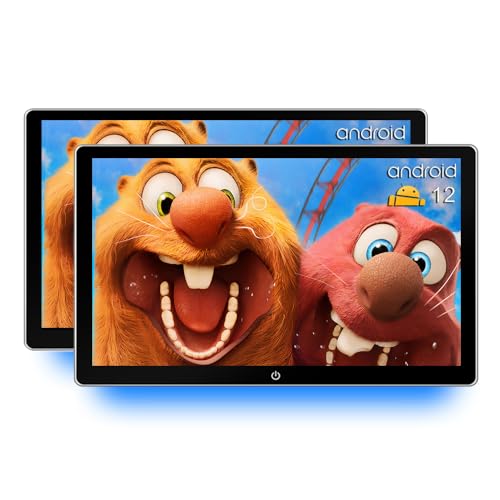
- Android 12 with WiFi, Bluetooth, HDMI in/out and USB for versatile media playback.
- 10.1″ touchscreen with clear visuals and simple navigation for backseat viewing.
- Dual inputs and reliable connectivity, designed for easy installation in many car models.
Buying Guide: Key Purchase Considerations
When choosing car headrest monitors, consider screen size, operating system, and content flexibility. Larger screens improve viewing comfort for multiple passengers, but may require more space and more robust mounting. Android-based units offer access to streaming apps, games, and offline downloads, while devices with wireless mirroring let passengers cast from phones without cables. Ensure compatibility with your vehicle’s power supply, especially if you want dual-monitor configurations or HDMI pass-through.
- Display quality and size: Balance screen size with vehicle interior space. IPS panels tend to offer better color and viewing angles, which is useful in rear seats where multiple passengers watch from different seats.
- Operating system and app availability: Android-based units provide access to Google Play or APK stores; consider whether you need Netflix, YouTube, Disney+, or other apps and if offline downloading is possible.
- Connectivity: Look for WiFi, Bluetooth, USB, HDMI, and Miracast/AirPlay support. Wireless screen mirroring reduces clutter and improves safety by enabling front-seat control.
- Mounting and installation: Check mounting brackets, fitment range, and whether the system is compatible with your car’s headrest bars. Some kits include dual power adapters for easier setup in multiple vehicles.
- Storage and performance: RAM and ROM determine multitasking and offline content capacity. Higher RAM helps smoother playback and app switching, especially for 4K content.
- Safety and parental controls: Models with front-seat control apps and restricted playback can help minimize backseat distractions for drivers.
- Input versatility: HDMI in/out, USB, and SD card slots allow you to connect gaming consoles, streaming devices, or media sticks for flexible use.
- Durability and compatibility: Verify compatibility with a wide range of car models, including older vehicles, and confirm that the device can handle long trips without overheating.
In evaluating your options, weigh the need for ultra-large displays against the practicality of installation space and power needs. If you frequently transport multiple passengers or prefer streaming options, Android-powered headrest monitors with wireless mirroring and offline storage can offer the most versatility. For simpler setups, dual 7″ displays or smaller 10.1″ units provide solid performance with straightforward installation. Consider also future-proofing through devices that support the latest connectivity standards and app ecosystems.