Best Auto-Unlock Smart Locks for Modern Homes
Smart locks with auto-unlock and seamless remote access offer convenience and enhanced security for busy households. The following selections emphasize hands-free entry, app control, and reliable notifications. Each product below supports multiple unlock methods, including fingerprints, codes, apps, and voice assistants, with direct 2.4 GHz Wi-Fi connectivity for remote management. Explore practical picks that fit front doors, back doors, and handles-as-lock setups, and compare features to find the best fit for your home.
| Product | Brand | Key Features |
|---|---|---|
| ULTRALOQ U-Bolt Pro WiFi Smart Lock | ULTRALOQ | 8-in-1 entry; auto unlock; app control; fingerprint; keypad; eKeys; voice control |
| ULTRALOQ Smart Lock U-Bolt Pro | ULTRALOQ | 7-in-1 entry; auto unlock; app & logs; anti-peep keypad; voice control |
| Wyze Auto-Lock Bolt v2 | WYZE | AI learning fingerprint; auto-lock; long battery life; USB-C backup |
| Philips Wi-Fi Door Lock | Philips | Wi-Fi, multiple unlock methods, remote control, voice assistants, auto lock |
| Philips Wi-Fi Smart Lock With Handles | Philips | Locks with handles; multiple unlocks; app remote control; auto lock |
ULTRALOQ U-Bolt Pro WiFi Smart Lock

The ULTRALOQ U-Bolt Pro combines 8-in-1 entry with built-in WiFi for direct remote control without a hub. It supports AI-powered fingerprint ID, keypad access, app control, auto unlock, and auto lock, plus eKey sharing and voice control with Alexa and Google Assistant. The lock also provides a door sensor for status alerts and logs of activity, making it suitable for homes, apartments, and small offices. Connectivity is 2.4GHz WiFi only, so ensure your router location provides stable coverage.
ULTRALOQ Smart Lock U-Bolt Pro

This 7-in-1 system integrates fingerprint, anti-peep keypad, app control, auto unlock, and auto lock. It stores up to 100 fingerprints and up to 50 customizable codes for backup access. The lock supports Bluetooth and, with the optional bridge, can work away from home. It operates on 2.4GHz WiFi only, which keeps setup simple for many households and reduces potential interference with other devices.
Wyze Auto-Lock Bolt v2

Wyze Lock Bolt v2 offers a fingerprint reader with AI-based learning to speed up future unlocks. It features an 8-month battery life with AA cells and a USB-C port as a backup power option. The lock supports app control, real-time access logs, and can work with voice assistants via the Wyze ecosystem. This makes it a practical choice for homeowners who want fast, hands-free entry and adaptive recognition in a budget-friendly package.
Philips Wi-Fi Door Lock

Designed for flexible access, this model supports app, passcode, fingerprint, physical key, and voice unlock via Alexa or Google Assistant. Built-in Wi-Fi enables remote control from anywhere, with auto-lock functionality to help secure doors when you forget. It requires a 2.4GHz network and notes that batteries are not included. It’s suitable for households seeking a versatile, voice-enabled option that works directly through a smartphone app.
Philips WiFi Keypad Door Lock With Handle
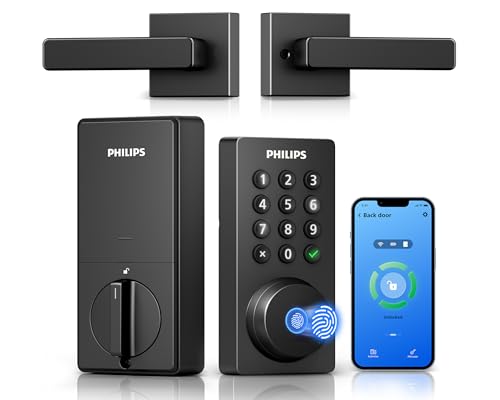
This lock with handles provides 2 lever handles and a Philips WiFi lock, expanding compatibility with existing doors and handles. It supports multiple unlock methods (fingerprint, PIN, keys, and app), along with remote control and voice unlock. The package emphasizes easy upgrading of door hardware while delivering secure, convenient access management from a mobile app and compatible voice assistants.
Buying Guide: Key Considerations for Auto-Unlock Smart Locks
- Unlock methods: Look for locks offering multiple methods (fingerprint, keypad, app, physical key, and voice control) to suit different scenarios and users.
- Connectivity and hubs: Direct Wi-Fi (no hub) simplifies setup, but some models may require a bridge for full remote access away from home. Confirm 2.4GHz compatibility and coverage in your entry area.
- Auto unlock and auto lock: Auto unlock can streamline entry when you approach with a paired phone, while auto lock helps ensure doors secure behind you. Check sensor accuracy and timing settings in the app.
- Security features: Anti-peep keypads, duress codes, tamper alerts, and activity logs help you monitor access. Consider BHMA ratings for hardware strength and build quality.
- Battery life and power options: Long-lasting batteries minimize maintenance, while USB-C back-up or power banks provide contingency power during outages.
- Installation and compatibility: Some models include handles as part of the lock set, while others require compatible doors or changes to existing hardware. Assess door type, thickness, and strike compatibility.
- Voice assistant integration: If you rely on Alexa, Google Assistant, or Apple HomeKit, verify compatibility and routine support for smooth hands-free control.
- Remote access and security: Evaluate the privacy and security of remote access features, including how logs are stored and who can share access through eKeys or codes.
- Warranty and support: Review manufacturer warranties, replacement terms, and availability of customer support for setup and troubleshooting.
When choosing among these options, consider the door location (front vs back), whether you prefer handles integrated into the lock, and the ecosystem you already use for smart home automation. Each model listed provides a balance of convenience, security, and remote control to fit typical American homes.