Best Professional Scan Tools for Accurate Vehicle Diagnostics
Finding the best professional scan tool can transform automotive maintenance by enabling quick and accurate diagnostics for a wide range of vehicles. These tools uncover trouble codes, monitor live data, and offer bidirectional controls to make repair processes efficient. Below is a summary table comparing top scan tools that provide advanced features suitable for mechanics and enthusiasts alike.
| Product | Brand | Features |
|---|---|---|
| ANCEL AD310 Classic OBD II Scanner | ANCEL | Read & clear engine codes, freeze frame data, durable cable, no battery needed |
| GEARWRENCH Professional Bi-Directional Scan Tool | GEARWRENCH | OE-level diagnostics, bi-directional control, free lifetime updates |
| BlueDriver Bluetooth Pro OBDII Scan Tool | BlueDriver | Enhanced diagnostics, ABS/SRS/airbag codes, live data, unlimited repair reports |
| TOPDON ArtiDiag900 Lite Bidirectional Scan Tool | TOPDON | 8-inch touchscreen, Bluetooth 5.0, active tests, 8 reset functions, wireless diagnosis |
| Innova 5610 OBD2 Bidirectional Scan Tool | Innova | Bidirectional commands, live data for ABS/SRS, dealership-level re-learns, reset functions |
ANCEL AD310 Classic Enhanced OBD II Scanner
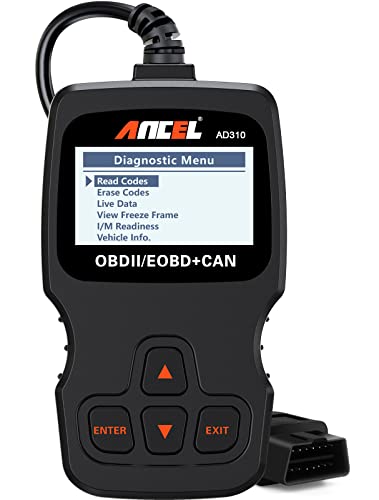
The ANCEL AD310 Classic OBD II Scanner offers a straightforward solution to diagnose and clear check engine light codes on 1996 or newer vehicles supporting OBD2 protocol. Recommended by notable experts such as Scotty Kilmer, this device provides CEL diagnosis with live and hard memory data, freeze frame parameters, and I/M readiness checks.
Designed with a compact, ergonomic body and a 2.5-foot insulated cable, the AD310 is built to withstand drops and tight engine bay spaces. Powered directly from the vehicle’s OBDII port, it requires no batteries or charging. Its clear, bright screen and simple button layout make it accessible for both professionals and DIYers.
GEARWRENCH Professional Bi-Directional Diagnostic Scan Tool

The GEARWRENCH GWSMARTBT is a high-tech bi-directional scan tool designed to deliver OE-level diagnostics through your smart device. It allows users to perform live actuation tests and full bi-directional controls, enabling active command over vehicle systems for advanced troubleshooting.
This device stands out with its no-subscription lifetime free software updates, ensuring long-term value without recurring fees. Its direct smartphone interface offers convenience and adaptability for professionals seeking a streamlined diagnostic workflow.
BlueDriver Bluetooth Pro OBDII Scan Tool for iPhone & Android

BlueDriver offers a professional-grade OBDII scan tool that connects wirelessly to iPhone and Android devices. It reads and clears codes for engine, ABS, SRS, airbags, and over 7000 vehicle issues, far exceeding standard code reader capabilities.
With live data streaming and comprehensive repair reports, BlueDriver empowers users to identify root causes alongside probable fixes. Its enhanced vehicle diagnostics mirror those performed by professional mechanics, making it suitable for thorough diagnostics without subscription fees.
TOPDON ArtiDiag900 Lite 2025 Bidirectional Scan Tool

The TOPDON ArtiDiag900 Lite represents a next-gen diagnostic device with a large 8-inch touchscreen, Bluetooth 5.0, and Android 11.0 OS. It features powerful hardware including a 10000mAh battery delivering up to 12 hours of continuous use and ultra-fast CPU for rapid diagnostics.
It enables bidirectional control commands to test components such as injectors, windows, wipers, and headlights. This tool supports wireless Bluetooth diagnostics up to 33 feet, ideal for professional workshops requiring a convenient and extensive suite of testing functions with 8 reset options and DTC repair guidance.
Innova 5610 OBD2 Bidirectional Scan Tool with Live Data

The Innova 5610 offers professional-grade functionality including bidirectional controls to command features like fuel pump activation and electronic parking brake retraction. It provides live OEM and OBD2 data streams for ABS, SRS, transmission, and more advanced systems.
This tool is suitable for users seeking dealership-level re-learn procedures and enhanced reset functions. While not universal for all vehicles, it targets select makes and models requiring in-depth diagnostic and repair commands, backed by US-based technical support and included updates.
Buying Guide: How to Choose the Best Professional Scan Tool
When selecting a professional scan tool, consider these critical factors to ensure it meets your diagnostic and repair needs:
Vehicle Compatibility
Ensure the scan tool supports your vehicle’s make, model, and OBD protocol. Most modern tools cover 1996 and newer OBD2 vehicles, but some offer extended support for manufacturer-specific codes and advanced systems.
Diagnostic Capabilities
- Basic OBD2 Functions: Reading and clearing engine codes, freeze frame, live sensor data.
- Advanced Systems: ABS, SRS airbags, transmission, TPMS, and more.
- Bidirectional Controls: Ability to send commands to vehicle components for diagnostics and active testing.
- Reset Functions: Oil reset, EPB reset, battery and maintenance resets enhance serviceability.
User Interface and Connectivity
Tools vary from handheld standalone units with LCD screens to Bluetooth devices syncing with smartphones or tablets. Consider whether you prefer a dedicated device or mobile app compatibility for easier updates and data management.
Update Policies
Regular software updates provide new features and expanded vehicle database coverage. Some devices offer free lifetime updates, while others require subscription fees. Opt for a scan tool with a cost-effective update model.
Portability and Build Quality
Look for a device that is compact, rugged, and comfortable to hold or carry around the shop or garage. Durable cables and robust construction minimize downtime from equipment failure.
Battery Life and Power Source
Some scan tools draw power directly from the OBD port, while others have internal batteries requiring charging. Long battery life is crucial for wireless or tablet-style tools to support extended diagnostics.
Technical Support and Documentation
Access to reliable customer service, tutorials, and detailed manuals enhances the overall experience, especially for complex diagnostics and vehicle-specific troubleshooting.
With these buying considerations in mind, choosing a professional scan tool aligned to your workflow will significantly improve vehicle diagnostics and repair efficiency.