Best AirPlay Car Adapters for Seamless Wireless CarPlay
For drivers who want the convenience of wireless CarPlay without clutter, these AirPlay adapters convert wired CarPlay systems to wireless, offering fast auto-reconnect, stable connections, and low latency. Below are five top picks based on compatibility, performance, and user-friendly setup. Each product pairs iPhone capabilities with car infotainment, delivering navigation, calls, music, and apps on the dashboard screen.
| Product | Brand | Key Benefit |
|---|---|---|
| Jemluse Wireless CarPlay Adapter | Jemluse | Advanced 7A chip, fast auto-connection |
| Teeran Wireless CarPlay Adapter 2025 | Teeran | Ultra-compact, dual-band for stability |
| Cleviton Wireless CarPlay Adapter | Cleviton | 3x faster connection, minimal footprint |
| Burnt Sugar Wireless CarPlay Adapter | Burnt Sugar | Ultra-low latency, broad compatibility |
| Ginlvnda Wireless CarPlay Adapter | Ginlvnda | 2-in-1 wireless CarPlay, quick auto-reconnect |
Jemluse Wireless CarPlay Adapter

The Jemluse CarPlay adapter targets a streamlined, high-performance experience. It emphasizes a strong transmission rate with 5.8 GHz WiFi, 5.3 Bluetooth, and an 8-core processor to speed up maps, media, and messaging to the car display. Its 7A microchip and rugged aluminum design are built for durability and long-term reliability. The device aims for automatic connection and seamless CarPlay operation, supporting navigation, music, Siri, calls, and more through wired CarPlay systems. It touts multi-user seamless connectivity for faster, more stable CarPlay from iOS 10+.
Teeran Wireless CarPlay Adapter 2025 Upgrade

The Teeran model emphasizes a mini cube design that hides neatly in the USB port, providing a clean interior. It offers plug-and-play setup with automatic reconnection whenever the car starts, reducing wait times. A dual-band 2.4GHz + 5GHz chipset is designed to improve stability and reduce latency, delivering smoother CarPlay experiences for music, maps, and calls. This option focuses on a compact footprint without sacrificing performance.
Cleviton Wireless CarPlay Adapter

The Cleviton adapter highlights an ultra-compact form with a 3x faster connection speed and automatic auto-connect when entering the vehicle. It markets a nearly invisible installation, reducing clutter in the cabin while delivering wireless access to CarPlay features, maps, music, and calls. The device uses a recent A7 Ultra chip and Wi-Fi 6 dual-band tech to deliver stable performance and reliable, lag-free streaming and navigation.
Burnt Sugar Wireless CarPlay Adapter
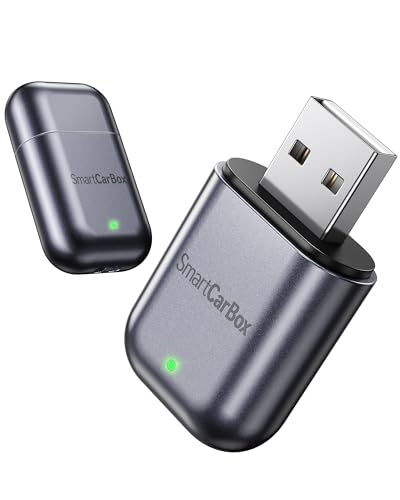
Burnt Sugar markets a fast and stable CarPlay upgrade with ultra-low latency. It combines 2.4+5.8 GHz Wi-Fi and Bluetooth 5.3 for reliable real-time responsiveness and improved audio quality. The plug-and-play design ensures auto-connection on entry, reducing setup steps. It claims broad compatibility with 800+ 2016+ vehicles that have wired CarPlay, though it notes some exclusions for certain brands. This option emphasizes a balance of performance and broad compatibility.
Ginlvnda Wireless CarPlay Adapter
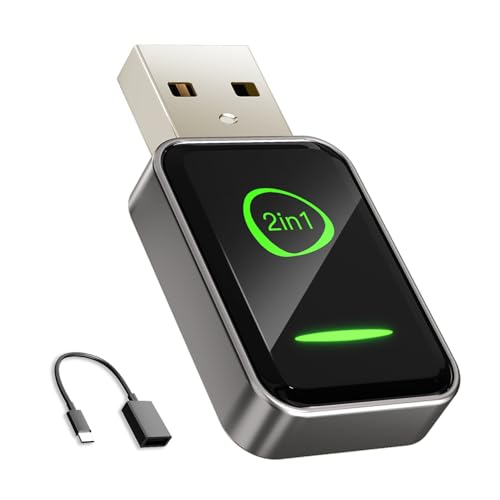
The Ginlvnda model highlights a 2-in-1 wireless CarPlay and Android Auto capability, turning wired CarPlay into fully wireless quickly. It emphasizes a 2-second auto-reconnect with a dual-band Wi-Fi setup for lag-free media streaming and mapping. Its compact dongle design is intended to sit discreetly in the USB port, delivering a clean cabin and straightforward use for iPhone users seeking quick access to CarPlay features on compatible vehicles.
Buying Guide
- Compatibility: Verify your car supports wired CarPlay and check the adapter’s supported models or brands. Some adapters list broad compatibility but exclude specific brands or models.
- Latency and stability: Look for dual-band Wi‑Fi (2.4GHz + 5GHz) and Bluetooth versions that promise low latency and stable connections, especially for navigation and streaming.
- Setup and auto-reconnect: Favor plug-and-play units with automatic reconnection as the car starts, minimizing manual steps and ensuring a seamless experience.
- Size and installation: Compact dongles that sit flush in the USB port reduce clutter. Consider whether your vehicle’s USB/port placement allows easy access and cooling.
- Durability and heat: Metal housings and robust internal components improve heat dissipation and longevity in varying temperatures.
- Car system limitations: Some adapters work only with cars pre-equipped with wired CarPlay; Tesla, BMW, or some models may be excluded. Confirm your car’s system requirements.
- Audio and video quality: If available, review claims about audio pass-through quality, map responsiveness, and screen mirroring fidelity to ensure clear calls and navigation.
- Future-proof features: Look for devices with ongoing firmware updates and support for the latest iOS versions to maintain compatibility over time.
Overall, choosing the best airplay adapter for car depends on your vehicle’s compatibility, desired footprint, and how critical ultra-low latency is for your daily driving. The selections above balance quick setup, stable wireless CarPlay connections, and discreet installations for American drivers seeking a clutter-free cabin experience.