Best Android Auto Box for Car Entertainment on the Go
The modern car turns into a smart cabin when you upgrade with an Android Auto box. These standalone devices convert your factory wired CarPlay or Android Auto setup into a wireless, app-friendly experience. This guide highlights five top options, comparing features like wireless CarPlay/Android Auto, built-in Android systems, streaming apps, and ease of use. Whether you want Netflix in the backseat or a smarter navigation assistant, these adapters are designed to expand in-car entertainment and connectivity.
| Product | Brand | Key Feature | Notes |
|---|---|---|---|
| ZYW Magic AI Box Wireless CarPlay Adapter | ZYW | 4K streaming, WiFi 6, 32GB storage | 3-in-1: Wireless CarPlay, Wireless Android Auto, Android 10.0 |
| Wireless CarPlay Adapter Android Auto – Smart AI Box | ATOTOSELECT | Standalone Android AI system, dual Wi‑Fi, built-in voice | AI assistant included for safer driving |
| Joywind 3-in-1 HDMI Input Car TV & Wireless CarPlay | Joywind | HDMI input, wireless CarPlay/Android Auto, video streaming | Turns car screen into entertainment hub |
| TERUNSOUl 3-in-1 Wireless CarPlay & Android Auto | TERUNSOUl | 3-in-1: CarPlay, Android Auto, Android 10.0 | Pre-installed streaming apps; broad compatibility notes |
| ByteWave 4-in-1 Wireless CarPlay Android Auto | ByteWave | 4-in-1: CarPlay, Android Auto, Android 12, TF card | 5‑second auto-connect; streaming with preloaded apps |
Below are five standout models selected for American drivers seeking reliable wireless CarPlay and Android Auto upgrades, with a focus on streaming capability, ease of setup, and compatibility with factory wired systems.
ZYW Magic AI Box Wireless CarPlay Adapter

The ZYW Magic AI Box combines wireless CarPlay and wireless Android Auto with a full Android 10.0 OS. It supports a 4K streaming experience for video apps like Netflix and YouTube and uses WiFi 6 for a lag-free connection. A robust thermal design enhances reliability in extreme temperatures (-20℃ to 60℃), ensuring stable performance in various climates. It’s designed for vehicles with factory wired CarPlay or Android Auto, and it includes a 32GB storage option to install apps and keep favorites handy. The device is built to switch seamlessly between wireless CarPlay, Android Auto, and native Android navigation and apps.
Wireless CarPlay Adapter Android Auto – Smart AI Box

This standalone Android AI Box functions as a full multimedia system. It runs apps like YouTube directly on the display and turns your car into a smart entertainment center. Dual Wi‑Fi modules separate CarPlay/Android Auto connectivity from general internet access, which improves stability and reduces interference. An included AI voice assistant (DriveChat GenAI) supports hands-free control for safer driving, navigation, and media search. The device is designed for easy plug-and-play use with factory wired CarPlay/Android Auto, making it a practical upgrade for daily drivers.
Joywind 3-in-1 HDMI Input Car TV & Wireless CarPlay

Joywind offers an all-in-one solution with Wireless CarPlay, Wireless Android Auto, and an HDMI TV input. This unit transforms a compatible factory screen into a multimedia hub, allowing streaming apps like Netflix and YouTube via HDMI devices such as Fire TV Stick or Google TV. It’s designed for quick plug-and-play use and supports real-time screen mirroring from smartphones, making road trips more enjoyable for passengers. The device aims to minimize cable clutter while providing a straightforward setup and instant wireless access to maps, music, and calls.
TERUNSOUl 3-in-1 Wireless CarPlay & Android Auto

TERUNSOUl provides a 3-in-1 experience with Wireless CarPlay, Android Auto, and Android 10.0. The device comes pre-installed with popular streaming apps such as YouTube and Netflix, and users can download more via Google Play or APKPure. It targets broad compatibility with iPhone 7 and newer (iOS 10.0+) and Android 11+. The package includes USB-A to Type-C cables, and the system claims broad model compatibility while noting that certain car brands may require additional configuration. This model emphasizes a straightforward space-saving design for upgrading wired systems to wireless use.
ByteWave 4-in-1 Wireless CarPlay Android Auto
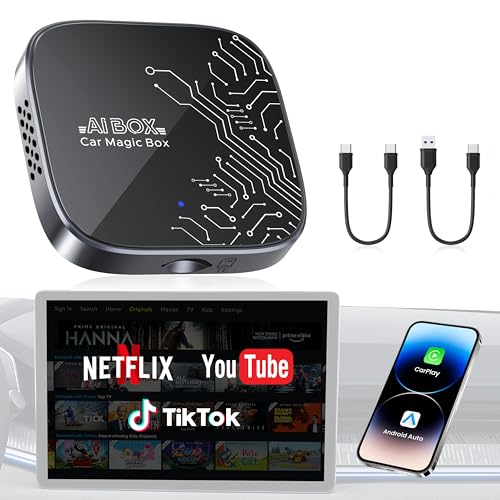
ByteWave’s 4-in-1 Smart CarPlay AI Box merges wireless CarPlay, wireless Android Auto, Android 12, and a TF card slot. It enables wireless conversion of wired CarPlay/Android Auto and debuts with built-in Netflix, YouTube, and TikTok. A notable feature is a quick 5-second auto-connect after initial setup, along with a straightforward four-step process. It relies on a hotspot or WiFi connection for streaming, and the device is designed to reduce cable clutter while providing a polished in-car streaming experience. A compact, all-in-one solution for drivers who want hands-free control and rich media options.
Buying Guide: Key Purchase Considerations For Android Auto Boxes
- Compatibility: Verify that the device supports your vehicle’s wired CarPlay/Android Auto system and is compatible with your phone’s operating system (iOS or Android). Some models list exceptions for specific car brands or trims; confirm before purchase.
- Wireless Performance: Look for devices with dual or dual-band Wi‑Fi, robust Bluetooth, and a modern processor to reduce lag and ensure smooth streaming. Wi‑Fi 6 support is a plus for stable connections in-car.
- Streaming Apps And Storage: Some adapters come with built-in apps (Netflix, YouTube, TikTok) and storage (32GB or more). Consider whether you need pre-loaded apps or the ability to download additional apps from a store.
- Android OS Experience: If you want a full Android experience, choose models that run Android 10.0 or newer, with a clean interface and support for app downloads via Google Play or APK sources.
- Ease Of Setup: Prefer plug-and-play devices with minimal configuration. Some models auto-reconnect after initial setup; others may require re-pairing if you switch cars.
- Temperature And Durability: In-car electronics face wide temperature ranges. Look for units tested for reliability in various climates and with sufficient thermal management to prevent overheating.
- Video And Audio Quality: For in-car entertainment, 4K streaming is appealing, but ensure your display and connection can support the desired resolution without compromising audio sync.
- Compatibility Caveats: Some devices note compatibility limits with certain car brands or OEM systems. Confirm model-specific limitations and return policies before buying.
- Remote And Control: Some options include remotes for backseat passengers or voice assistants for hands-free control. Consider passenger needs and safety implications for in-car use.
- Connectivity Independence: Decide whether you want a standalone Android OS device (for apps and media) or primarily a CarPlay/Android Auto adapter that mirrors the phone’s apps and navigation.
Choosing the right Android Auto box depends on how you primarily use your car’s display. If you want a full Android environment with a built-in app store, a standalone AI box may suit you. If your goal is to preserve factory controls while adding wireless CarPlay/Android Auto and streaming, a lighter adapter with strong wireless performance could be ideal. In all cases, verify vehicle compatibility, review installation steps, and check for firmware updates to maintain security and performance over time.