Best Car Diagnostic Computer for Quick Code Reading and Diagnosis
Choosing a reliable car diagnostic computer helps you read and clear trouble codes, monitor live data, and pinpoint issues without a trip to the shop. This guide reviews five top OBD2 scanners that cover a range of needs—from basic code readouts to professional-level diagnostics. Each option integrates broad vehicle compatibility, intuitive interfaces, and key features to support DIYers and everyday drivers alike.
| Product | Brand | Key Benefit |
|---|---|---|
| ANCEL AD310 Classic Enhanced Universal OBD II Scanner | ANCEL | Fast codes, live data, and simple use for most 1996+ vehicles |
| OBD2 Scanner Diagnostic Tool by WEJOWE | WEJOWE | Extensive DTC library and multilingual support |
| FOXWELL NT604 Elite | FOXWELL | 5-in-1 diagnostics including ABS/SRS and live data |
| MOTOPOWER MP69033 Car OBD2 Scanner | MOTOPOWER | Clear codes, read live data, multilingual and wide protocol support |
| BlueDriver Bluetooth Pro OBDII Scan Tool | BlueDriver | Subscription-free professional-grade diagnostics via app |
Across these options, you’ll find scanners that power directly from the vehicle, provide actionable fault-code definitions, and support various languages and vehicle makes. The following sections summarize each product’s strengths, helping you compare quickly and make an informed choice.
ANCEL AD310 Enhanced OBD II Scanner
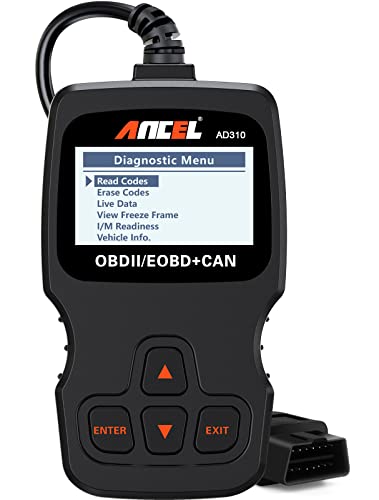
The AD310 is a compact, widely used tool suitable for quick check-engine-code reads. It reads and clears diagnostic trouble codes for emission systems, views freeze frame data, and displays I/M readiness. Its design emphasizes portability and straightforward operation, making it a popular choice for DIYers who need fast results without advanced functionality. It powers directly from the vehicle’s OBDII port, avoiding the need for extra batteries. The device’s build prioritizes durability for on-the-go use, with a sturdy cable and clearly labeled buttons for easy navigation.
Key features include fast code reading, clear code definitions, live data view, and access to memory data. If you’re troubleshooting a check engine light and want a reliable, no-frills scanner, the AD310 provides practical coverage for most 1996 and newer OBD2 vehicles.
WEJOWE OBD2 Scanner Diagnostic Tool

The WEJOWE scanner is a feature-rich option with a large built-in library of 35,901 DTCs. It reads and clears codes, shows I/M readiness, and retrieves vehicle VIN and live data. It supports multiple languages, making it suitable for users around the world. In practice, this model helps identify fault codes quickly and provides meaningful definitions to guide repairs or professional diagnosis without needing to search online. It’s compatible with most vehicles manufactured after 1996 that use a 16-pin OBD2 port.
For users who want built-in diagnostic depth without constantly referencing external resources, the WEJOWE scanner offers robust data access, freeze-frame details, and an emphasis on efficient fault-code interpretation. It’s a strong mid-range choice for home garages and quick diagnostic sessions.
FOXWELL NT604 Elite OBD2 Scanner

The NT604 Elite is a 5-in-1 diagnostic tool designed for car owners who want broader system coverage. It scans engine, ABS, SRS, and transmission, with live data streaming, DTC lookup, data playback, and printing options. It’s advertised as a ready-to-use device, with software updates included in the package. The tool emphasizes reliability and affordability while giving users insight into system readiness and potential faults before they escalate.
Note that while it offers extensive scanning capabilities, it is framed as a diagnostic tool rather than a repair instrument. To turn off warning lights, underlying issues must be addressed first. The NT604 Elite prioritizes ease of use and depth of data for owners who perform routine diagnostics and occasional maintenance checks across multiple vehicle types.
MOTOPOWER MP69033 OBD2 Scanner

The MP69033 offers a practical set of OBD2 features with a 2.8-inch LCD display and direct power from the vehicle. It supports 9 protocols, making it compatible with a broad range of 1996 US-based, 2000 EU-based, and Asian cars. Features include reading and erasing codes, viewing live data, I/M readiness, freeze-frame data, and vehicle information. This model emphasizes readability and straightforward operation, appealing to users who want clear on-screen data without extra gadgets or subscriptions.
With multilingual support and a focus on essential diagnostic functions, the MP69033 balances accessibility with capability. It’s especially suitable for users who want a dependable, low-maintenance tool for routine diagnostics and basic repairs.
BlueDriver Bluetooth Pro OBDII Scan Tool
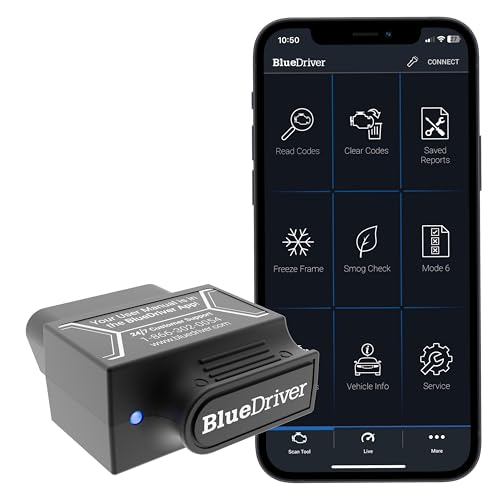
BlueDriver represents a premium, app-based diagnostic experience. It delivers professional-grade diagnostics with the ability to read and clear codes across ABS, SRS, airbag, and more than 7000 issues across vehicles from 1996 onward. The tool emphasizes repair guidance and live data health monitoring, offering unlimited repair reports with potential fixes. It operates via Bluetooth and relies on a connected mobile app for a broad, user-friendly interface that appeals to smartphone users who prefer ongoing software updates and cloud-based data access.
BlueDriver’s strength lies in delivering a comprehensive, subscription-free diagnostic workflow directly to your phone or tablet. It’s well-suited for users seeking a high-end, durable tool with extensive data, real-time monitoring, and actionable repair guidance, all without an attached screen.
Buying Guide: Key Purchase Considerations
- Vehicle compatibility: Most scanners cover 1996+ vehicles with OBDII ports. If you own newer models or a mix of makes, check the device’s compatibility list and language options to ensure broad support.
- Scope of diagnostics: Basic readers focus on engine codes, while premium models add ABS, SRS, transmission, EVAP, and live data streaming. Decide whether you need full system diagnostics or standard code reading.
- Live data and freeze-frame: Real-time data helps diagnose intermittent issues. Freeze-frame data provides a snapshot of sensor readings at the time a fault occurred, which is helpful for technicians.
- Data interpretation: DTC libraries and built-in definitions reduce the need to google code meanings. A larger DTC library speeds up troubleshooting and reduces guesswork.
- Power source: Most handheld scanners draw power from the vehicle. USB or battery-powered options exist but may add cost or complexity.
- Interface and ease of use: A clear display, intuitive menus, and language support improve user experience, especially for DIYers.
- Connectivity: Bluetooth-enabled devices pair with smartphones or tablets, offering portability and app-driven interfaces. Wired devices provide reliability without pairing concerns.
- Updates and support: Some models include software updates or cloud services. Consider how updates are delivered and whether a subscription is required.
- Cost vs. value: Higher-end tools offer broader systems and deeper data, but for many drivers, a solid mid-range scanner provides ample functionality at a lower price.
When selecting a car diagnostic computer, align features with your goals—quickly reading codes on the go, or performing deep diagnostics across multiple vehicle systems. By weighing compatibility, data richness, and user experience, you can choose a device that improves maintenance decisions and helps you stay informed about your vehicle’s health.