Best Car Laptop Mounts for on-the-Go Productivity
Finding a reliable car laptop mount can turn a vehicle into a mobile office. The options below cover sturdy builds, full-motion flexibility, and no-drill installation, making it easier to work between drives. The selections prioritize compatibility with laptops up to 17 inches, adjustable heights, and secure clamps to protect devices on the road.
The following quick-reference table highlights five well-rounded car laptop mounts, including main features and intended use cases. This helps you compare at a glance before diving into detailed reviews.
| Product | Brand | Key Benefit | Max Laptop Size / Weight | Installation Style |
|---|---|---|---|---|
| VIVO Single Laptop Car Mount | VIVO | Full articulation for ergonomic viewing | Up to 17″ / 11 lbs | Exposed floor seat bolts (no drilling) |
| Mobotron MS-426 | Mobotron | Versatile vertical & horizontal adjustment | Up to 11 lbs | No drilling required (seat rail access) |
| SPIRRELAB Car Laptop Mount | SPIRRELAB | Two cooling fans and heavy-duty base | 9–17″ laptops | Truck base with riser bases |
| Mount-It! No-Drill Passenger Seat Mount | Mount-It! | Cooling tray and full-motion adjustment | Up to 17″ laptops | No-drill passenger seat installation |
| DICMKY Car Laptop Mount | DICMKY | Height-adjustable with dual-mode (steering wheel or desk) | Up to 17″ laptops | Steering wheel or desktop mode |
Note: All options support common work scenarios, including desktop mode for meetings on the go, and easy disassembly for quick vehicle transitions. The selections emphasize stability, ergonomic positioning, and compatibility with a range of vehicle interiors.
VIVO Single Laptop Car Mount
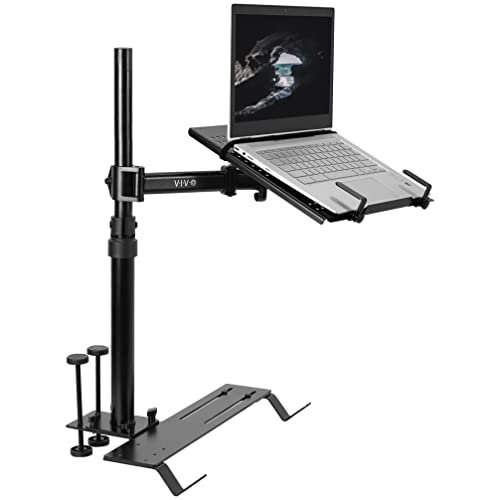
The VIVO MOUNT-CAR01 provides a spacious 14.2” x 11.9” tray designed to hold laptops, notebooks, and tablets up to 17 inches and 11 pounds. Ventilated surface enhances airflow to prevent overheating, while flexible tray clips secure the device. The full-articulation system includes tilt, swivel, rotation, and height adjustment with a telescoping pole ranging from 18.5” to 26.3”. An arm bracket offers another 9” of adjustment, enabling ergonomic positioning in cars, trucks, and SUVs equipped with exposed floor seat bolts.
DICMKY Car Laptop Mount

The DICMKY model emphasizes height-adjustable ergonomics with a 5-position height setting. It supports two modes—steering wheel desk and desktop—so users can switch quickly between seeking a temporary office in the car and a stable desk setup. The compact design simplifies installation, and when not in use, it can be stowed in the car’s interior seam or carried in a briefcase. Quick transitions require no tools and minimal space, making it suitable for short trips or longer journeys alike.
MELIPRON Truck Laptop Mount

The MELIPRON mount offers an ergonomic, adjustable height, tilt, and 360° swivel for ideal viewing angles. It attaches without drilling by mounting to the passenger seat rail bolts, preserving the vehicle’s interior and avoiding leaks or damage. A quick-release telescopic pole enables easy removal when not in use, helping keep passenger space open in shared vehicles or occasional use scenarios. It is designed for trucks, vans, and other vehicles requiring robust support during mobile work.
Mobotron MS-426 Standard Vehicle Laptop Mount
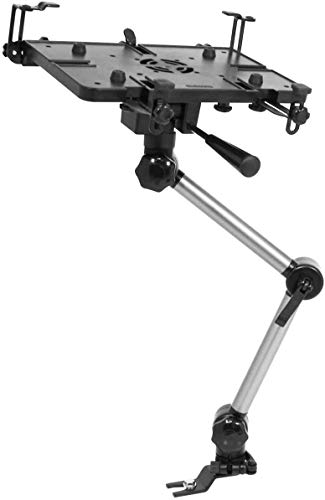
The Mobotron MS-426 provides full adjustability with both vertical (180°) and horizontal (360°) tray movements. It supports up to 11 pounds and requires no drilling if the passenger seat rail is flat and the bolt is accessible. Its design focuses on stable performance in diverse driving conditions, delivering reliable positioning for laptops up to 17 inches when parked and during transit.
SPIRRELAB Car Laptop Mount

SPIRRELAB combines stability with cooling, featuring two built-in USB fans and a rugged 3mm steel base that fastens to passenger seat bolts. The two base mounting points form a triangular base for even force distribution and reduced wobble. It supports laptops and tablets from 9 to 17 inches and includes extra Velcro stabilization. The tray is reinforced with durable aluminum components and a high-strength plastic tray, capable of handling up to 5 kg for reliable on-the-road use.
Mount-It! Car Laptop Mount No-Drill (14–22.25”)

This Mount-It! model is designed to turn parked vehicles into mobile workstations with a no-drill installation. It supports laptops up to 17 inches with a universal fit, and its cooling tray helps manage device temperatures. Full-motion adjustability provides 360° swivel and substantial tilt range, along with a height adjustment of 14 to 22.25 inches. The system is built to support professional use in cars, vans, and SUVs without permanent modifications.
Mount-It! Car Laptop Mount No-Drill (13–17”)

This Mount-It! model offers a stable workspace in vehicles by enabling full-motion adjustability for optimal positioning. It fits laptops up to 17 inches and includes a cooling tray. The no-drill installation approach makes it suitable for professionals and temporary use in varying vehicle types, including cars, vans, and trucks. The mount’s adjustable height supports comfortable typing and reading angles during travel or parked work sessions.
Buying Guide: Key Purchase Considerations
- Compatibility: Check laptop size and weight, mounting surface availability, and vehicle type (car, truck, SUV, or van). Look for mounts that accommodate up to 17 inches and at least 11 pounds to ensure broad compatibility.
- Installation: No-drill or low-drill options preserve vehicle interiors. Confirm whether mounting requires seat rails, floor bolts, or dashboard space, and verify tool-free assembly where possible.
- Adjustability: Prioritize full-motion bases with tilt, swivel, rotation, and height adjustments to support ergonomic use in various driving positions and during longer work sessions.
- Cooling and heat management: A cooling tray or built-in fans helps prevent laptop overheating during extended use on the road.
- Stability and safety: Look for secure clamps, non-slip surfaces, and robust materials (steel or aluminum) for stability on uneven roads and high speeds.
- Portability and storage: Quick-release poles and foldable designs improve portability for shared vehicles or multi-driver fleets.
- Vehicle impact on interior: Some mounts rely on seat rails or bolts without drilling, while others require more permanent mounting. Choose based on how often you switch vehicles.
- Price-to-value: Compare build quality, warranty, and included accessories (clips, velcro, and extra bases) to determine the best value for your typical work scenarios.
When evaluating options, consider how frequently you work on the go, the typical driving conditions, and whether you need temporary or semi-permanent installation. For fleet use, prioritize secure mounting, even weight distribution, and easy removal between vehicles. For personal use, emphasis on no-drill installation, ergonomic flexibility, and cooling features can simplify daily workflows.