Best PC Steering Wheels for Realistic Racing on Your Computer
Gamers who want a true driving feel on PC know that a great steering wheel can transform titles from casual to immersive. This guide highlights top options that pair well with PC setups, offering precise force feedback, durable builds, and multi‑platform compatibility. Whether you’re chasing lifelike steering or enhanced control across racing sims, these wheels deliver reliable performance independent of console branding. Read on to compare features, compatibility, and practical considerations for a PC‑focused racing rig.
| Product | Brand | Platform | Highlights |
|---|---|---|---|
| Logitech G920 Driving Force | Logitech G | PC, Xbox | Force feedback, leather wheel, adjustable pedals |
| Logitech G29 Driving Force | Logitech G | PC, PS4/PS5 | Dual‑motor FF, quiet steering, durable build |
| PXN V9 GEN2 | PXN | PC, PS4/PS5, Xbox | 16‑bit magnetic encoder, multi‑platform, app adjustments |
| PXN V900 GEN2 | PXN | PC, PS4/PS5, Xbox | Dual vibration motors, 16‑bit encoder, flexible app |
| PXN V3 PRO | PXN | PC, PS4/PS5, Xbox | 180°/270° rotation, programmable buttons, adjustable pedals |
Logitech G920 Driving Force Racing Wheel
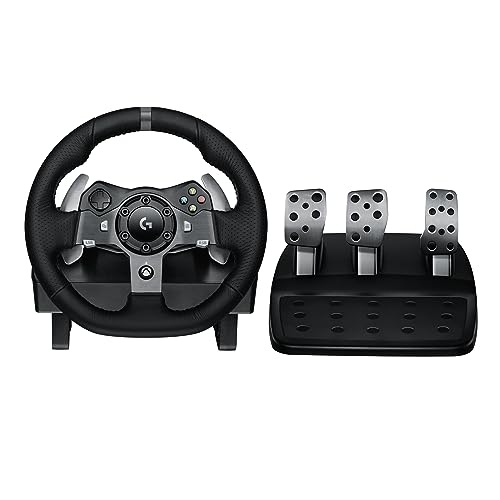
The Logitech G920 Driving Force Racing Wheel provides a realistic driving feel with force feedback that replicates road texture, torque, and braking dynamics. Helical gearing delivers smooth, quiet steering, while a hand‑stitched leather wheel cover adds comfort during long sessions. The included floor pedals offer a nonlinear braking feel and adjustable faces for precise control, making it a strong PC option for racing titles that prioritize immersion and reliability.
Logitech G29 Driving Force Racing Wheel

Designed for PlayStation systems and PC, the G29 offers robust dual‑motor force feedback for realistic road feel and steering response. Its helical gears provide smoother operation and quieter performance, while a leather wheel cover maintains comfort during extended sessions. The pedals are pressure‑sensitive with a nonlinear brake feel and adjustable shapes, supporting tighter braking control on PC racing sims and driving games alike.
PXN V9 GEN2 Universal Wheel

The PXN V9 GEN2 is a versatile, multi‑platform steering wheel that covers PC, PS3/PS4, and Xbox ecosystems. It features a dedicated app for adjustments, 16‑bit magnetic encoding for precise motion capture, and dual paddle shifters for quick gear changes. Built‑in dual vibration motors provide nuanced feedback, enhancing immersion when playing racing titles that emphasize road feel and turn resistance on PC setups.
PXN V900 GEN2 Racing Wheel

The PXN V900 GEN2 pairs 16‑bit encoding with dual vibration motors, creating multi‑level feedback that responds to acceleration, braking, and terrain changes in supported games. Its cross‑platform compatibility supports PC, PS4/PS5, and Xbox Series X|S, making it a flexible choice for users who want a single wheel for multiple rigs or titles. The shifter and pedal bundle helps simulate realistic transmission dynamics with adjustable pedal thresholds for personal feel.
PXN Racing Wheel V3 PRO

The PXN V3 PRO supports PC, PS4, PS3, Xbox One, Xbox Series S/X, and Switch, delivering broad compatibility in one package. Its 180° design (with 270° option) provides racing realism across a wide field of view. Linear pedals offer refined throttle and brake control, while paddle shifters deliver responsive gear changes. Programmable buttons and adjustable sensitivity levels help tailor setup to individual preferences and game requirements.
Buying Guide: Key Purchase Considerations
Platform compatibility matters most when choosing a PC steering wheel. If you primarily play on PC, ensure the wheel supports Windows and, ideally, a variety of sim titles from modern racers to indie sims. Check the type of force feedback (FFB) and whether it uses belt, gear, or hybrid systems. Heavier wheels with robust FFB tend to feel more realistic but may require a sturdier desk or stand. Pedals vary in how they respond; nonlinear brakes and adjustable faces help replicate real braking forces. Consider wheel diameter and grip texture for comfort during long sessions.
Software support can influence long‑term usability. Wheels that pair with dedicated software or apps often allow per‑game tuning and button mapping, improving setup efficiency. Magnetic encoders (as found on PXN models) can provide precise, repeatable feedback, while 16‑bit sensing generally delivers fine control granularity. Finally, assess budget, as entry‑level wheels may suffice for casual use, while enthusiasts often opt for higher fidelity and cross‑platform versatility.
In a mixed rig, multi‑platform wheels (PC, PlayStation, Xbox) provide flexibility if you rotate consoles or upgrade hardware. For dedicated PC racing, prioritize wheels with strong force feedback, quality construction materials, and reliable pedal assemblies. The wheels listed here emphasize a balance of realism, compatibility, and value, enabling players to tailor their setup to the games they love most.
To maximize performance, pair your wheel with a solid stand or a stable desk mount, ensure proper seating position, and calibrate sensitivity in both game settings and any wheel software. Regular firmware updates from the manufacturer can also improve responsiveness and compatibility with new releases.
Additional Perspectives
- Budget users may prioritize a wheel with good FFB and durable pedals rather than multisystem support, focusing on PC titles first.
- Casual racers might prefer quieter operation and a smaller wheel diameter for comfortable, shorter play sessions.
- Hardcore sim enthusiasts often seek high‑fidelity FFB, precise encoders, and expandability with shifters, pedals, and mounting hardware.
- Setup constraints like desk space, seating, and mounting options will influence whether a compact wheel or a full cockpit setup is right for you.