Best Head Up Display for Car: Clear, Safe Vehicle HUD Solutions for 2026
Head-Up Displays (HUD) for cars convert critical driving data into a transparent, easy-to-read projection on your windshield or dashboard. This article highlights five reliable models designed for universal USB-equipped vehicles, emphasizing GPS accuracy, automatic brightness, and safety alerts. Whether you drive a compact sedan or a large truck, these HUDs aim to reduce distraction and keep essential information within your line of sight. Explore options from KUOWEIHUD, wiiyii, SinoTrack, and more to find a model that fits your vehicle and driving style.
Summary of selected products:
| Product | Brand | Key Benefit | Link |
|---|---|---|---|
| KUOWEIHUD Heads up Display for Cars (K1-White) | KUOWEIHUD | Digital GPS HUD with automatic brightness; USB plug & play | View |
| KUOWEIHUD Heads up Display for Cars (Large Font) | KUOWEIHUD | Large font display; strong GPS signal; brightness adjustment | View |
| KUOWEIHUD Heads up Display for Cars (Speeding Alert) | KUOWEIHUD | Speeds alert; USB plug & play; auto brightness | View |
| wiiyii OBD2 Gauge Display HUD | wiiyii | OBD+GPS data; multiple interfaces; fatigue/over speed alerts | View |
| SinoTrack 5.5 Inch HUD | SinoTrack | 5.5″ large LCD; MPH, over-speed and fatigue alerts | View |
Below, five selected HUD models are explored with their core features, installation notes, and how they compare for common driving scenarios.
KUOWEIHUD K1-White HUD For Cars
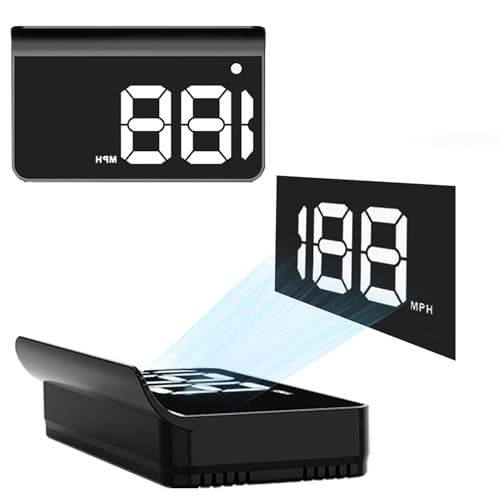
The K1-White model from KUOWEIHUD is designed for plug-and-play use with USB-powered dashboards. It emphasizes dual-mode signal reception (GPS plus Beidou), supporting up to 32 satellites with a 10 Hz refresh rate for speed data accuracy. Automatic brightness adjustment helps maintain legibility in bright sun and dim nights, reducing eye strain during long trips. The device is described as suitable for all vehicles that have a USB port, including motorcycles and trucks, making it a versatile option for mixed fleets or multi-vehicle households.
Key considerations:
- Signal robustness in urban canyons and rural routes due to dual-mode satellite support.
- Automatic brightness enhances visibility without manual tweaks during night driving.
- USB plug-and-play installation promises minimal tool use; verify vehicle USB compatibility and power draw.
Ideal usage scenarios include commuting in varying urban infrastructures, fleet vehicles that may switch between cars and small trucks, and motorbike riders needing quick, easy HUD access. Review the provided features to confirm compatibility with your vehicle’s USB port and windshield mounting preferences.
KUOWEIHUD Large Font HUD For Cars

This model emphasizes a larger numeric display for easier readability, paired with a robust GPS+BDS signal framework and a 10 Hz update rate. Automatic brightness ensures visibility across day and night, while the USB plug-and-play configuration simplifies installation in most vehicles with a USB port. The product is positioned for drivers who prefer a bold, legible readout without straining to identify smaller fonts.
Considerations:
- Large font readability may be particularly beneficial for older drivers or those with less-than-perfect eyesight.
- Solid satellite tracking helps maintain speed data reliability on both city streets and highways.
- Ensure windshield clearance and dash space accommodate the larger display without obstructing vision.
Best use cases include daily commuting, rental car setups, and family vehicles where multiple drivers need an easily seen HUD interface.
KUOWEIHUD Speeding Alert HUD

This HUD variant highlights a speeding alert feature alongside automatic brightness and universal USB compatibility. The device maintains GPS+BDS satellite reception with a 10 Hz refresh rate, ensuring timely speed data and alert accuracy. The model’s emphasis on speed alerts makes it suitable for drivers who want proactive feedback on highway speeds and potential over-speed risks. It’s designed for simple installation in any vehicle with a USB port, including motorcycles and larger vehicles.
Key insights:
- Speed alerts help mitigate inadvertent speeding on highways and busy roads.
- Multi-vehicle suitability supports households with more than one car or a small fleet.
- As with other KUOWEIHUD units, verify display size and mounting position to balance visibility with safety.
Good fit for long road trips, learners in early stages of driving, and drivers who value proactive speed monitoring.
wiiyii OBD2 Gauge HUD
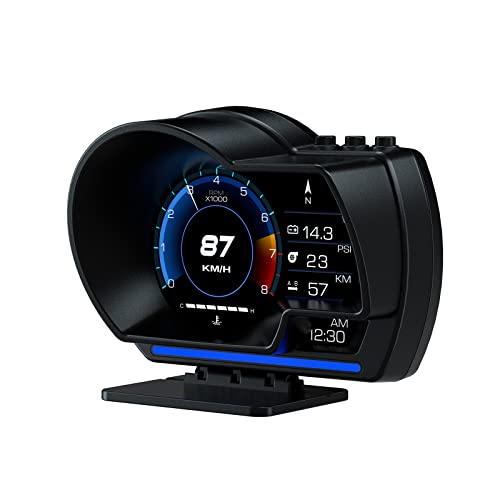
The wiiyii model integrates OBD2 data with GPS information, delivering a multi-sensor readout including speed, RPM, water temperature, and more. It uses adaptable interfaces and offers a variety of display modes, making it flexible for drivers who want to monitor engine diagnostics along with speed. The unit emphasizes easy, non-destructive dashboard or windshield mounting and offers alerts for fatigue and overspeed.
Practical considerations:
- OBD2 integration enables real-time engine data alongside road metrics, which can be valuable for maintenance awareness and early issue detection.
- Distraction-minimizing display angles reduce the need to divert glance away from the road.
- Choose between dashboard or windshield mounting based on vehicle interior and driver preference.
Suitable for drivers who want a more comprehensive cockpit readout without installing a larger, separate GPS HUD unit.
SinoTrack 5.5 Inch HUD

The SinoTrack HUD features a generous 5.5-inch LCD display capable of showing MPH, driving time, distance, and satellite information. It also includes a fatigue driving alert and an overspeed alarm to promote safer driving behavior. The automatic brightness sensor adjusts the screen in outdoor and nighttime conditions. As a larger display option, it can be especially helpful for drivers who favor comprehensive on-screen data without needing to lean forward to read smaller numerals.
Considerations:
- Large screen improves readability for data-rich driving, but ensure it does not obstruct view.
- Fatigue and overspeed alerts provide proactive safety support during long trips.
- Be mindful of mounting location to avoid glare and ensure a stable signal reception.
Best for drivers who appreciate a wide data set at a glance and regular alerting about driving patterns over longer journeys.
Buying Guide: Key Considerations For Choosing A Car HUD
When selecting a head-up display for your car, consider these factors to ensure you pick a model that aligns with your needs and vehicle configuration:
- Display size and readability: Larger screens are easier to read at a glance, but can obstruct the view. Balance visibility with any potential obstruction and consider eye-level or horizon placement on the windshield or dash.
- Data scope: Decide whether you want basic speed and RPM data, or a more comprehensive readout including driving time, distance, fatigue alerts, and engine diagnostics via OBD2.
- GPS and satellite coverage: Dual-mode GPS+BDS reception improves accuracy in urban canyons and remote areas. Confirm that the device maintains a stable connection in your typical driving environment.
- Brightness and visibility: Automatic brightness adapts to daylight and night conditions, reducing glare. Check if a manual brightness override is available for extreme lighting scenarios.
- Installation and compatibility: Most HUDs are USB plug-and-play, but some require specific power adapters or dash mounts. Ensure compatibility with your vehicle’s USB ports and windshield/mounting space.
- Alerts and safety features: Speeding alerts, fatigue warnings, and fault indicators add safety value. Consider how often you want these prompts and whether they can be muted if needed.
- Durability and warranty: Look for durable housings, resistance to car vibrations, and warranty coverage in case of sensor or display issues.
- Power management: Verify the device’s power consumption and whether it powers off with the vehicle or remains active when the ignition is off.
- User interface and customization: Some models offer multiple interfaces and themes. Choose a UI layout that aligns with your preference for data presentation.
- Vehicle fleet considerations: If you manage multiple vehicles, a HUD with universal compatibility and consistent mounting options reduces setup time across cars.
In practice, the best HUD for you hinges on your emphasis: speed awareness and simplicity, or broader vehicle data with advanced alerts. If readability is paramount, a large-font model with automatic brightness may be ideal. If you value maintenance insights, an OBD2-integrated unit provides engine data alongside standard HUD readouts. Finally, always verify that the chosen unit does not introduce glare or interfere with airbag deployment zones and ensure safe mounting that does not distract you during driving.