Best Heads Up Display for Cars: Clear, Safe, and Quick-Read HUD Options
Choosing the right heads up display (HUD) for your vehicle can improve safety, reduce distractions, and keep vital data in view. This guide highlights five top HUD options, covering GPS and OBD capabilities, brightness auto-adjustment, and plug‑and‑play installation. Each entry features a quick overview, notable features, and practical usage notes to help American drivers compare at a glance.
| Product | Key Feature | Display Size | Power/Installation |
|---|---|---|---|
| KUOWEIHUD HUD Model A | Dual GPS+BDS with 10 Hz refresh | Large font | USB Plug & Play |
| wiiyii Car HUD P6 | 10 interface modes; dual install options | Digital LCD | Dashboard or windshield mount |
| K1-White KUOWEIHUD HUD | Automatic brightness; 32 satellites | Large font | USB Plug & Play |
| SinoTrack HUD | Fatigue and overspeed alerts; 5.5″ LCD | 5.5″ LCD | USB/OBD options |
| HotSunTesTec 9.6″ HUD for Tesla | Wireless CarPlay/Android Auto; OTA updates | 9.6″ screen | Plug-and-play (Tesla-specific) |
Note: All products listed are designed to project essential vehicle data onto the windshield, helping drivers keep eyes forward. Features vary from GPS-based speed readouts to combined OBD data, with brightness sensors and simple installation emphasized across the range.
KUOWEIHUD Heads Up Display for Cars – GPS+BDS Speedometer

Data reliability is supported by dual-mode chip technology that tracks GPS and BDS signals with a 10 Hz refresh rate. The HUD can access up to 32 satellite signals for stable, precise speed information whether in city traffic or rural drives. Automatic brightness adjustment ensures legibility in bright daylight and at night. It is designed for universal USB port installation, suitable for cars, motorcycles, and trucks. A straightforward plug-and-play setup minimizes installation time while maintaining safety benefits.
wiiyii Car HUD P6 – OBD+GPS Smart Gauge
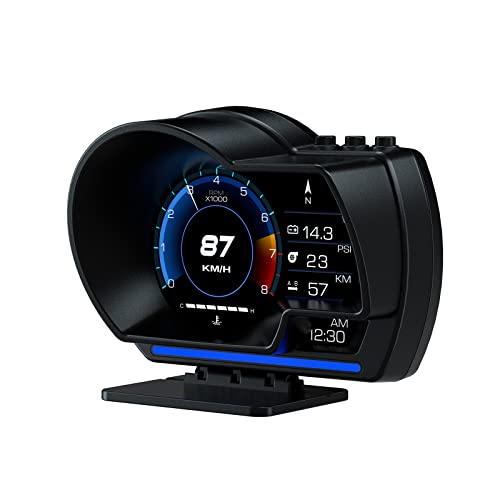
This HUD emphasizes driver safety by delivering speed data without glancing down. It offers 10 interface options and two installation methods: a dashboard mount or windshield attachment. The device readable data stream, fault codes, and customizable displays support a tailored experience. While the unit aims to minimize distraction, it remains essential to ensure the chosen mounting angle provides a direct forward view. Suitable for a wide range of vehicles, with emphasis on easy, non-destructive installation.
KUOWEIHUD Heads Up Display – Large Font, USB Plug & Play
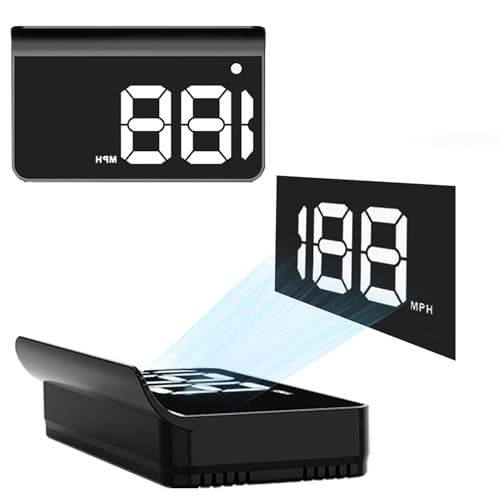
This variant mirrors the KUOWEIHUD approach with automatic brightness adjustment and robust GPS+BDS reception in a large-font display. It emphasizes universal USB compatibility, making installation straightforward across car types, motorcycles, and trucks. The combination of automatic brightness, wide satellite connectivity, and plug-and-play functionality supports quick setup and a clear, distraction-minimizing readout for speed and other vital information while on the road.
SinoTrack Digital GPS Speedometer HUD

The SinoTrack HUD presents a large 5.5-inch display that shows MPGs, driving time, mileage, and direction. It includes two speed scales and a central compass for orientation. A key safety feature is overspeed and fatigue alerts, helping drivers maintain safe speeds and take breaks after extended driving. The screen brightness auto-adjusts with ambient light, maintaining legibility in varying conditions. An automatic dimming option reduces glare at night, supporting safer night driving without manual intervention.
HotSunTesTec 9.6″ Tesla HUD – Wireless CarPlay

Designed for Tesla Model Y and Model 3, this HUD features a large 9.6-inch screen with a slim bezel and high resolution, delivering crisp CarPlay navigation and media. It supports wireless CarPlay and Android Auto with smooth 60 FPS performance, enabling hands-free command via Siri or Google Assistant. The system runs on an automotive-grade Linux platform and a capable CPU, delivering faster response times with low power requirements. OTA updates ensure ongoing improvements and new features without hardware changes.
Buying Guide: Key Purchase Considerations
- Display size and readability: Larger screens provide easier data access from a short glance, but ensure the unit fits your vehicle’s dash and windshield projection without obstructing the view.
- Data sources: GPS-only HUDs depend on satellite signals for speed, while GPS+OBD (or GPS+S) units display richer metrics like RPM, fuel consumption, and engine status. Choose based on how much data you need while driving.
- Brightness auto-adjustment: An automatic brightness feature improves visibility across daytime and nighttime conditions, reducing eye strain and glare.
- Installation convenience: Plug-and-play USB installations are common, but some models offer windshield mounting or non-destructive dashboard placement. Consider your vehicle type and preferred mounting method.
- Alerts and safety features: Fatigue warnings, overspeed alarms, and fault-code readouts add value beyond simple speed readouts. Evaluate which alerts align with your safety priorities.
- Vehicle compatibility: Some HUDs target all USB-equipped vehicles, while others offer OBD‑II integration for broader data. Check compatibility with your car’s year, make, and model.
- Update and support: OTA updates or vendor support matter for long-term reliability, especially for high-end CarPlay-enabled models.
- Price vs. features: A balance between screen size, data richness, and installation complexity often defines value. Consider how often you’ll use enhanced features versus basic speed readouts.