Best OBD Car Scanners for Quick Engine Diagnostics
Finding the right OBD car scanner can save time, money, and trips to the shop. This guide highlights five reliable options widely used in the US, spanning budget-friendly models to feature-rich tools. Each product section includes a direct Amazon link, an image, and core capabilities to help you compare at a glance. The buying guide at the end covers essential considerations, from compatibility to data access, so you can choose the tool that best fits your vehicle and skill level.
| Product | Brand | Key Use | Best For |
|---|---|---|---|
| ANCEL AD310 Classic | ANCEL | Read/clear codes, live data, freeze frame | |
| MOTOPOWER MP69033 | MOTOPOWER | Wide protocol support, live data | |
| BlueDriver Bluetooth Pro | BlueDriver | Wireless diagnostic, repair reports | |
| FOXWELL NT301 | FOXWELL | Live data, basic scans | |
| WEJOWE OBD2 Scanner | WEJOWE | Extensive DTC library, I/M readiness |
Each option above serves a different use case—from simple code reading to advanced diagnostics—ensuring there’s a fit for every budget and mechanical confidence level. Below, you’ll find detailed product sections with direct purchase links, followed by a practical buying guide to finalize your decision.
ANCEL AD310 Classic Enhanced OBD II Scanner
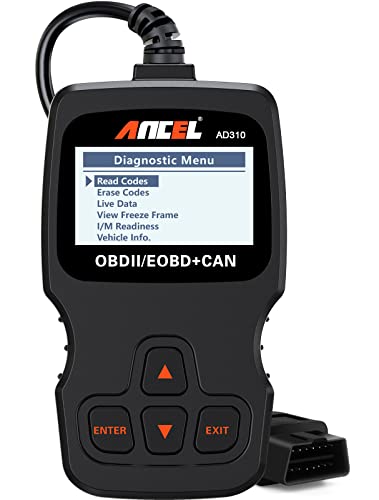
The ANCEL AD310 is a compact, widely used OBD II scanner ideal for quick checks. It reads and clears diagnostic trouble codes (DTCs), displays live data, freeze frames, and I/M readiness status. It supports 1996 and newer vehicles with OBD II protocols. The device emphasizes speed and ease of use, providing clear results without requiring external power sources. Its sturdy build and straightforward controls make it a popular choice for do-it-yourselfers and professional technicians alike.
MOTOPOWER MP69033 Car OBD2 Scanner

The MOTOPOWER MP69033 offers practical, multi-function OBD2 scanning with a built-in DTC lookup library. It reads and erases codes, shows freeze frame data, I/M readiness, and vehicle information. With support for 9 protocols across 1996 US, 2000 EU, and Asian vehicles, it’s suitable for a broad fleet. The 2.8-inch LCD display provides a clear view of results, and it draws power directly from the vehicle’s OBDII port, eliminating the need for batteries or chargers.
BlueDriver Bluetooth Pro OBDII Scan Tool
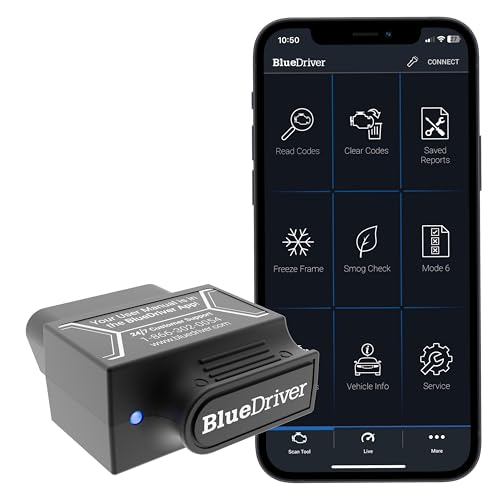
BlueDriver stands out for its wireless convenience and professional-grade diagnostic capabilities. It reads and clears codes across ABS, airbag, SRS, TPMS, and more, with repair reports and live data. The app-based solution provides real-time vehicle health monitoring and suggested fixes, making it a robust option for enthusiasts who prefer a mobile, subscription-free experience. It’s designed for iOS and Android and commonly used by DIYers and professionals who want thorough diagnostics on the go.
FOXWELL NT301 OBD2 Scanner

The FOXWELL NT301 is a professional-grade OBD2 scanner tailored for mechanics who need reliable fault code retrieval and live data graphs. It supports basic OBDII functions, including reading and clearing codes, viewing live data, and monitoring MIL status. While it doesn’t handle ABS or SRS in depth, it provides accurate data streams and a straightforward interface, making it a solid choice for shop-grade diagnostics at an accessible price point.
WEJOWE OBD2 Scanner Diagnostic Tool

WEJOWE emphasizes an expansive DTC library and compatibility with most vehicles manufactured after 1996. It offers read and clear codes, I/M readiness, and vehicle information retrieval, with a wide language set to accommodate international users. Its emphasis on a large DTC repository helps users quickly interpret fault codes and guide repairs or professional diagnostics.
Buying Guide: Key Purchase Considerations For OBD Car Scanners
- Vehicle compatibility: Ensure the scanner supports your vehicle’s year, make, and model, as well as the OBD protocol (OBDII, CAN, etc.).
- Code reading vs. live data: Decide if you only need code reading or if you want live data streams, freeze frame data, and sensor graphs to analyze trends.
- Specialized functions: Some tools offer ABS/SRS, EVAP tests, or bi-directional controls. If you need these, prioritize models explicitly offering them; note that many entry-level scanners do not cover all systems.
- Library size: A larger DTC lookup library can speed up fault identification. Tools with 30,000+ codes provide broader coverage for manufacturers and regional variants.
- Power source: Verify whether the device is battery-powered, USB-powered, or car-powered via the OBDII port. Battery-free models reduce setup complexity.
- Display and usability: A clear, legible display or responsive app matters for quick interpretation, especially when diagnosing in dim environments.
- Connectivity: Consider wired vs. wireless (Bluetooth/Wi-Fi) depending on your preferred workflow and whether you want to use a smartphone or a dedicated screen.
- Software updates and support: Some brands offer firmware or app updates that expand functionality or fix bugs. Check for ongoing support and user forums.
- Price vs. features: Balance budget against needed capabilities. Basic readers handle codes well, while advanced tools provide deeper diagnostics and repair guidance.
- Usage scenario: For occasional at-home use, a simple code reader may suffice. For hobbyists or small shops, a more robust scanner with comprehensive data access can be worth the investment.
When selecting an OBD car scanner, align features with your typical maintenance tasks. If you regularly diagnose emissions statuses, monitor live sensor data, or need detailed repair guidance, pick a tool with broad DTC coverage and reliable data visualization. For occasional checks, a compact, straightforward reader can deliver fast, reliable results without complexity.