Best Overhead TVs for SUVs: In-Cabin Entertainment on the Go
For long road trips and daily commutes, an overhead SUV monitor adds rear-seat entertainment without clutter. This guide highlights top picks designed for different vehicle sizes, ensuring good image quality, reliable playback, and easy mounting. The selections emphasize IPS displays, 1080p capabilities, and versatile input options to fit various multimedia setups.
| Product | Brand | Screen Size | Key Benefit |
|---|---|---|---|
| 22″ Car Overhead Monitor | ZBARK | 22″ | Large screen with multiple inputs |
| XTRONS 10.2″ | XTRONS | 10.2″ | Compact for small vehicles; 1080p playback |
| XTRONS 11.6″ | XTRONS | 11.6″ | 1080p, ultra-thin, wide viewing angle |
| Kunfine 19″ | KUNFINE | 19″ | HDR10+ IPS display; built-in sound |
| Kunfine 15.6″ | KUNFINE | 15.6″ | Compact large-screen option with HDR10+ |
22-Inch Overhead Monitor With Wide Inputs

The 22-inch ZBARK overhead monitor provides a spacious viewing area for backseat passengers. Key specs include a 22-inch 16:9 screen with a brightness range of 300-500 cd/m² and a 700:1 contrast ratio, delivering clear colors and smooth motion with quick response times. It supports multiple formats (RM, RMVB, etc.) for full-format playback and offers versatile interface options such as AV, BNC, and VGA, including two AV inputs for easy source switching. This monitor is designed for stable transmission and flexible installation.
XTRONS 10.2 Inch Overhead Car Monitor

The XTRONS 10.2-inch overhead player is ideal for compact SUVs. It features 1280×720 HD resolution for sharp images, supports 1080p video playback, and formats like AVI, MP4, and JPG. Built-in stereo speakers and Bluetooth audio transmission provide convenient sound without extra accessories. The unit integrates HDMI, USB, and AV inputs for flexible multimedia connections, offering a simple, stable listening and viewing experience on the go.
XTRONS 11.6-Inch Ultra-Thin Overhead Monitor

This 11.6-inch car roof monitor delivers sharp visuals with 1366×768 resolution and a true 1080p video capability for smooth playback. Its ultra-thin profile (about 29mm when folded) and a wide 170-degree open angle offer flexible viewing angles. The model supports IR, USB, HDMI, and AV inputs, and a pair of black IR headphones is included for a private listening experience during travel.
Kunfine 19-Inch Overhead Monitor (Beige)
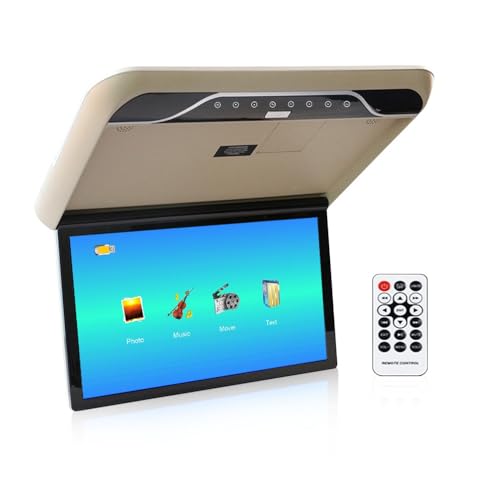
The Kunfine 19-inch overhead monitor uses HDR10+ technology with an IPS panel to deliver vivid colors and sharp images across large vehicles. It supports RMVB, AVI, MP4, MPG, and RM formats, reducing the need to convert media files. Built-in stereo speakers provide convenient audio without external equipment, ensuring a cohesive entertainment setup for passengers during road trips.
Kunfine 19-Inch Overhead Monitor (Black)

The black version shares the same 19-inch HDR10+ IPS display and broad format support as the beige variant, delivering immersive viewing for large vehicles. It offers built-in stereo speakers and Bluetooth audio transmission, allowing easy pairing with devices for movies and music without external speakers. The monitor is designed for straightforward installation and reliable playback on long journeys.
XTRONS 11.6-Inch Overhead Monitor With IR Headphones

This 11.6-inch XTRONS model combines a TFT wide screen at 1366×768 with true 1080p playback and a 170-degree viewing angle. Its IR input and included white IR headphones support private listening. HDMI, USB, and AV inputs provide flexible connections for various media sources, making it a versatile option for mid-sized SUVs and vans.
XTRONS 11.6-Inch Overhead Monitor (White IR Headphones)
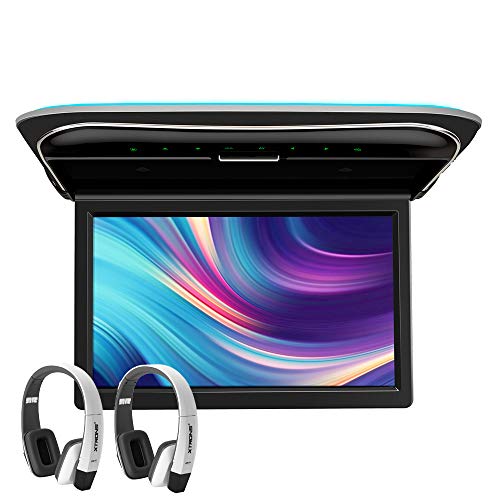
The white version mirrors the black variant’s feature set: 1366×768 TFT display, true 1080p playback, and a durable 170° viewing angle. It includes a pair of white IR headphones and maintains a slim, mountable profile. HDMI, USB, and AV inputs support a range of media sources, ensuring broad compatibility for in-car entertainment systems.
Buying Guide: Key Considerations For Overhead Car Monitors
- Screen size vs. vehicle cabin space: Larger screens are great for bigger SUVs and vans, but may overwhelm smaller cabins. Select a size that fits comfortably without obstructing rear passengers or trunk access.
- Resolution and video formats: Aim for 1080p playback when possible for crisp images. Look for support of common formats (MP4/AVI/WMV) and core codecs to reduce file conversion needs.
- Input options: Ensure HDMI, USB, and AV inputs match your media devices. Dual AV inputs are helpful for switching between sources without reconfiguring cables.
- Audio delivery: Built-in speakers are convenient, but consider Bluetooth or wired external options if you want higher fidelity or parental control over volume for riders.
- Mounting and durability: Check the roof-molt or flip-down mechanism, thickness when folded, and anti-vibration features for a stable viewing experience on rough roads.
- Power and wiring: Some units require separate power wiring or adaptors. Verify compatibility with your vehicle’s 12V system and any required harnesses.
- Viewing angle and anti-glare: A wide viewing angle and anti-glare screen help passengers watch comfortably from various seats and lighting conditions.
- Sound privacy: If multiple passengers share the cabin, consider models that include or support IR headphones for personal listening without disturbing the driver.
When selecting, compare screen size, resolution, input versatility, and mounting compatibility to your SUV’s headliner and seating arrangement. For larger families or frequent travelers, a dual-monitor setup may maximize the entertainment options. For weekend road trips after dusk, consider models with brighter panels and stronger speakers to keep image clarity up and noise levels appropriate inside the cabin.