Best Phone Mirroring for Car: Top 5 Wireless Car Screen Solutions
Discover the best phone mirroring options to transform your car’s infotainment system. These devices add wireless CarPlay, Android Auto, and HDMI screen mirroring, turning your vehicle into a mobile cinema and navigation hub. Below are five top picks that balance ease of use, stability, and feature variety for American drivers.
| Product | Brand |
|---|---|
| Joywind 2025 Upgraded 3-in-1 HDMI Input Car TV & Wireless CarPlay Adapter | Joywind |
| Coliatik Wireless Carplay Mirror Link Adapter | Coliatik |
| Mirror Phone to Car Screen Adapter 2026 Upgrade (1-D) | Zcayi |
| OTTOCAST Mirror Touch – Wireless CarPlay & Bi-Directional Mirroring | OTTOCAST |
| GETPAIRR 4-in-1 Wireless CarPlay/Android Auto & Car TV Mate Max | GETPAIRR |
| VNILRGLE 4-in-1 Wireless CarPlay & Android Auto Adapter | vnilrgle |
Note: This article focuses on five strong options that support wireless CarPlay/Android Auto, screen mirroring, and HDMI inputs when available. All products described aim to minimize wiring clutter and maximize in-car entertainment and navigation capabilities.
Joywind 2025 Upgraded 3-in-1 Wireless Hub

The Joywind 3-in-1 device acts as a single, streamlined hub for CarPlay, Android Auto, and HDMI input. It enables wireless CarPlay and wireless Android Auto, with a dedicated HDMI input for external media devices. This plug-and-play solution minimizes cable clutter while delivering instant access to maps, calls, music, and voice assistants. It also allows real-time screen mirroring from compatible smartphones, enabling entertainment and information on the car’s display. Setup is designed to be quick—just connect to the car’s USB port and pair your phone for automatic reconnection on entry.
Key benefits include a combined wireless ecosystem for navigation and entertainment, reduced cockpit mess, and compatibility with common streaming devices via HDMI for passengers. Real-world performance depends on car USB power availability and the stability of the car’s infotainment interface. This option is particularly appealing for drivers who want a straightforward upgrade without replacing factory head units.
Coliatik Wireless Carplay Mirror Link Adapter

The Coliatik adapter adds wireless functionality to original wired CarPlay systems and supports Wireless CarPlay, AirPlay, and Mirror Link in one unit. With upgraded 2.4/5 GHz WiFi and Bluetooth 5.0, it promises stable, lag-free streaming and navigation. The plug-and-play design means no extra apps or tools are required—simply connect, pair, and use. This solution targets drivers seeking a clean, cable-free experience without complex configurations, and it can be a strong fit for cars that already have wired CarPlay but would benefit from wireless access.
Considerations include the balance between range and stability in varying vehicle cabins, and whether you prioritise CarPlay mirroring or broader OS mirroring features. It’s a versatile option for households with multiple iOS devices and those who value a simple, wireless upgrade path.
Zcayi Mirror Phone to Car Screen Adapter (1-D)

The Zcayi 3-in-1 wireless car adapter converts a wired CarPlay setup into a wireless experience and supports CarPlay, AirPlay, and Mirror Link. It emphasizes fast 2.4/5 GHz WiFi and Bluetooth 5.0 for smooth streaming and navigation, along with a straightforward plug-and-play process. Users appreciate easy installation and quick device pairing, which makes it suitable for drivers who want reliable wireless access without lengthy setup.
As with any wireless car adapter, real-world performance hinges on the vehicle’s dashboard environment and interference from other devices. This option suits travelers who frequently switch between iPhone and Android devices and want a flexible, no-fuss upgrade.
OTTOCAST Mirror Touch — Wireless CarPlay & Bi-Directional Mirroring

The OTTOCAST solution emphasizes bi-directional mirroring and wireless CarPlay compatibility for 2016+ vehicles. The device supports control from the car screen, enabling safer navigation and entertainment without wires. It highlights the ability to mirror content from a range of devices and keep the car cockpit organized by reducing the need for charging cables and adapters. This option targets users who want a more immersive, cable-free experience that still maintains compatibility with newer iPhone and Android models.
Key aspects include a focus on wireless CarPlay reliability, ease of use, and the potential to turn the car into a mobile cinema with streaming apps. Users should check compatibility with their specific head unit and confirm support for their phone models to maximize value.
GETPAIRR 4-in-1 Wireless CarPlay/Android Auto & Car TV Mate Max
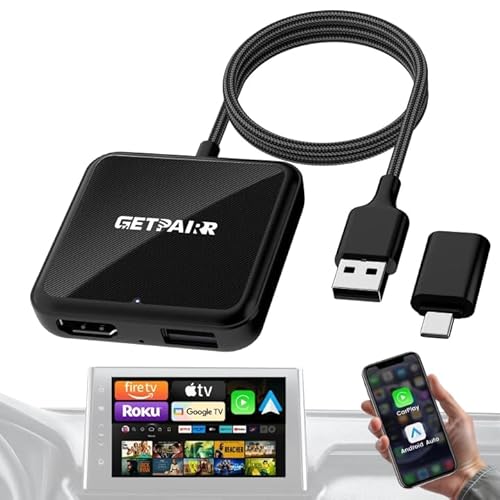
GETPAIRR’s Car TV Mate Pro Max integrates Wireless CarPlay, Android Auto, and HDMI in a compact dongle. It features faster auto-reconnect and steadier links with true plug-and-play operation. The HDMI output converts the car screen into a TV, enabling streaming from Fire TV Stick, Google TV, Apple TV, Roku, or other devices—up to 2K at 60Hz (with certain 4K sticks limited to 1080p/60Hz). It doubles as a screen mirroring adapter, allowing real-time content display from a connected phone. It notes that touch control on the car screen is not supported for HDMI devices.
Benefits include expanded media capabilities for passengers, flexible compatibility with various HDMI streaming devices, and a straightforward setup. Consider this option if you frequently use streaming apps in the car and want to leverage your existing HDMI devices on the road.
VNILRGLE 4-in-1 Wireless CarPlay & Android Auto Adapter
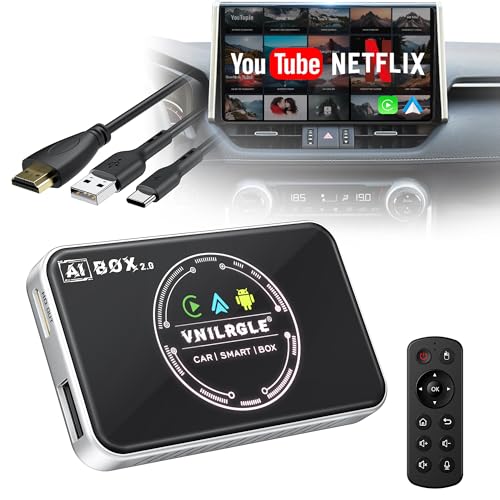
The VNILRGLE device combines Wireless CarPlay, Android Auto wireless, and an Android 12.0 system within a single box. It aims to turn every trip into an in-car entertainment session by enabling streaming from apps pre-installed like Netflix and YouTube, with the option to download more apps via Google Play and App Store. Compatibility requires that the car already has wired CarPlay or Android Auto. It includes cables to broaden compatibility across devices and notes that it’s not compatible with certain car brands in some instances. This 4-in-1 setup provides a versatile, expandable platform for diverse devices and apps.
When evaluating this option, consider whether your vehicle’s wired CarPlay/Android Auto baseline is fully supported and how much you value the ability to expand app availability directly in the car. This can be a strong fit for families or long commutes where streaming and multi-device compatibility are priorities.
Buying Guide: Key Purchase Considerations
- Compatibility: Ensure the device supports your car’s head unit (wired CarPlay/Android Auto) and your phone models. Some adapters work best with iPhone and select Android devices, while others target broader ecosystems.
- Connectivity: Look for 2.4/5 GHz WiFi and Bluetooth 5.0 for stable wireless performance. A strong wireless connection reduces lag during navigation and streaming.
- Plug-and-Play Ease: Prioritize devices advertised as plug-and-play with minimal or no app installation. This simplifies setup and daily use.
- HDMI and Media Capabilities: If you want to stream Netflix, YouTube, or play games, verify HDMI compatibility and supported resolutions (up to 2K in many models). Note any limitations with touch control when using HDMI.
- Mirroring vs. CarPlay Functionality: Some products emphasize wireless CarPlay, others focus on screen mirroring or AirPlay. Depending on your priorities—navigation, entertainment, or both—choose accordingly.
- Vehicle Age and Wiring: Vehicles built after certain years often have better head-unit interfaces for wireless adapters. For older cars, a simple plug-in that masquerades as CarPlay can still provide valuable upgrades.
- Security and Updates: Check for firmware updates and any security considerations tied to wireless adapters. Regular updates can improve stability and performance.
- Warranty and Support: Consider brands offering customer support and clear return policies. A longer warranty reduces risk when integrating new car tech.
These options provide a range of approaches—from 3-in-1 hubs to 4-in-1 media centers—allowing you to tailor your in-car tech to your daily commutes, road trips, and entertainment needs. When choosing, focus on ease of use, stability, and the specific features that align with your typical driving scenarios.