Best Portable Car Monitors for in-Car Screens
Finding a reliable portable monitor for car use can upgrade any road trip, daily commute, or service vehicle. This guide highlights five top options that balance image quality, connectivity, and travel-friendly design. Each product is evaluated for in-car versatility, including compatibility with laptops, smartphones, gaming consoles, and multimedia players. The selections emphasize eye comfort, easy setup, and durable builds to help readers choose a monitor that fits their vehicle and driving routine.
| Product | Brand | Key Benefit |
|---|---|---|
| KYY Portable Monitor 15.6” | KYY | Excellent color, HDR, compact and versatile |
| MNN Portable Monitor 15.6” | MNN | Dual Type-C with plug-and-play power and display |
| ASUS ZenScreen 16” | ASUS | Ultra-slim with eye-care features and multiple inputs |
| InnoView Portable Monitor 15.6” | InnoView | Plug-and-play with HDR and built-in speaker options |
| WONNIE 13.3” Car TV Headrest | WONNIE | Android headrest entertainment with OTA updates |
KYY Portable Monitor 15.6” Review

The KYY 15.6 inch portable monitor uses a Full HD 1920×1080 IPS panel with a wide 178° viewing angle and HDR technology. Its eye-friendly design reduces blue light and flicker, supporting long viewing sessions. It includes two full-function Type-C ports and a Mini-HDMI port, enabling a single-cable connection when the host device supports Thunderbolt 3/3.1 USB-C. At 1.7 pounds with a slim 0.3-inch profile, it is ideal for on-the-go dual-monitor setups or extending a phone screen for media and gaming. It also provides 3.5mm audio input and built-in speakers for added convenience.
MNN Portable Monitor 15.6” Review

The MNN monitor delivers 1920×1080 resolution on a portable 15.6″ IPS panel with an advanced matte finish and 178° viewing angle. It emphasizes eye protection with reduced blue light and flicker. It offers dual Type-C ports for plug-and-play power and signal, requiring a single USB-C cable when the host supports Thunderbolt 3/4 or USB 3.1 DP Alt Mode. Its lightweight design and included smart cover make it well-suited for travel, work-from-anywhere setups, and gaming on the go. A Mini HDMI input adds further compatibility for diverse devices.
Yxk 15.6” Ultra-Slim Portable Monitor
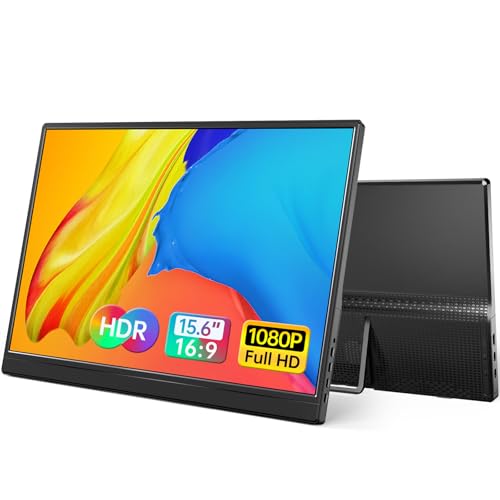
The Yxk monitor features 1920×1080 resolution with HDR support and a low blue light IPS panel. It relies on dual Type-C ports and a Mini HDMI input for flexible connections, enabling single-cable power and display transmission when devices support Thunderbolt 3/4 or USB-C DP Alt Mode. At about 1.43 pounds and 0.31 inches thick, it prioritizes portability for road trips, meetings, and gaming sessions on the road. The product is designed to be easily attached as a second screen for laptops or mobile devices while traveling.
ASUS ZenScreen 16” Review

The ASUS ZenScreen MB169CK offers a larger 16” Full HD IPS display with dual USB-C/USB inputs and a Mini-HDMI option for broader device compatibility. It emphasizes eye care with flicker-free and low blue light technologies, certified by TÜV Rheinland. The lightweight, ultra-slim form factor pairs with a 360° kickstand for flexible viewing angles, making it suitable for work, gaming, or media playback in the car or on the go. The ZenScreen focuses on a balance of portability, comfort, and connectivity.
WONNIE 13.3” Car TV Headrest Review

The WONNIE 13.3” car TV headrest system presents a 1920×1200 IPS touchscreen with 4K playback support, delivering strong multimedia performance for rear-seat passengers. It operates on Android 13 with OTA updates, providing access to Google Play and streaming apps via 5G/2.4GHz WiFi or mobile hotspots. Wireless Miracast/AirPlay support enables seamless phone mirroring, while the MyCar Link app functions as a remote control. This option targets in-car entertainment for back-seat comfort on long trips.
Buying Guide
Key considerations for selecting a portable car monitor include:
- Display quality and size: Choose a panel with 1080p or higher resolution for sharp images. Larger screens (14–16 inches) are great for back seats, while 13–15 inches offer portability for dash use.
- Connectivity: Look for dual Type-C ports, HDMI, and Mini-HDMI inputs to maximize compatibility with laptops, phones, game consoles, and multimedia players. Thunderbolt-enabled devices simplify plugging in with a single cable.
- Power options: Favor USB-C power delivery or built-in batteries with car adapters. Plug-and-play designs reduce setup time during trips.
- Eye comfort: Features such as flicker-free operation and low blue light can reduce eye strain on long drives or gaming sessions.
- Portability vs. durability: Ultra-slim, lightweight models are easier to move between vehicles or carry in a bag, but ensure the stand or kickstand can survive in-vehicle use.
- Built-in audio and stands: Internal speakers offer convenience; a smart cover or protective case helps shield the screen during travel and doubles as a stand for varied viewing angles.
- Smart features: Some models include Android-based interfaces with OTA updates, app stores, and wireless screen-mirroring, expanding entertainment options in the car.
- Warranty and support: A longer warranty can be valuable given the vibration and temperature changes inside vehicles.
Overall, the best portable car monitor balances image clarity, versatile inputs, portability, and in-vehicle usability. Prospective buyers should align features with their primary use—navigation, productivity, or rear-seat entertainment—and consider how the monitor will be mounted or stored inside the vehicle.