Best in-Car TVs With HDMI for Road Trips and Everyday Drives
If you want a versatile in-car entertainment setup, a TV or display with HDMI input can dramatically expand what your vehicle can do. This guide highlights five top options that pair easily with HDMI devices like Fire TV Sticks, Chromecast, game consoles, or portable DVD players. Each pick supports wiring, wireless CarPlay or Android Auto where applicable, and simple plug-and-play installation. Read on for practical insights, performance notes, and how to choose the right solution for your car’s display needs.
Summary Of Selected Products
| Product | Primary Benefit | HDMI / Car Use | Notes |
|---|---|---|---|
| Joywind 3-in-1 HDMI Car TV & Wireless CarPlay Adapter | All-in-one wireless CarPlay/Android Auto plus HDMI input | HDMI input for Fire TV Stick or similar | Plug & play; automatic reconnection |
| ByteWave 2-in-1 Wireless CarPlay & Car TV Mate Pro | Wireless CarPlay plus HDMI streaming | HDMI port for in-car streaming | No apps required; simple setup |
| GETPAIRR 4-in-1 Car TV Mate Pro Max | CarPlay, Android Auto, HDMI in one dongle | HDMI for streaming devices | 4th-gen with faster reconnect |
| TeckyGem 3-in-1 Car Play/Auto & HDMI Pro Max | Wireless CarPlay/Android Auto plus HDMI | HDMI streaming via TV stick | Metal & glass case |
| WONNIE 13.3″ Car TV Headrest Monitor | Large HD display for back seats with HDMI/USB | HDMI input and streaming compatibility | 4K-capable Android headrest with touch |
Note: Each product focuses on bringing streaming, mirroring, or app access to your car’s display through HDMI or wireless connections. Availability, compatibility, and features may vary by vehicle and phone model. Always verify that your car’s USB or power source can support the device you choose.
Joywind 3-in-1 HDMI Car TV & Wireless CarPlay Adapter

The Joywind device combines Wireless CarPlay, Wireless Android Auto, and an HDMI input in a compact unit. It enables streaming apps, navigation, and hands-free calling through your car’s touchscreen, while letting you connect HDMI devices like a Fire TV Stick or streaming stick. The setup is designed to be plug-and-play, with automatic phone reconnection for convenience. The HDMI input enables up to 2K video streaming on compatible screens, making road trips more entertaining for passengers.
Key features include:
– 3-in-1 wireless CarPlay, Android Auto, and HDMI input
– True plug-and-play with USB power
– Real-time screen mirroring from compatible devices
– Supports maps, music, calls, and voice assistants
ByteWave 2-in-1 Wireless CarPlay & Car TV Mate Pro

The ByteWave Car TV Mate Pro combines Wireless CarPlay with an HDMI streaming capability in one compact dongle. It converts a factory-wired CarPlay system to wireless while providing an HDMI output to connect streaming devices. This setup allows you to use iPhone apps like Maps and Music on your car display while watching content from streaming services on an HDMI-connected screen. Quick plug-and-play setup means no apps are required, and the vehicle’s original controls can still be used.
Important notes:
– HDMI port supports streaming devices for in-car viewing
– Requires a mobile hotspot or car Wi-Fi for online apps
– Simple, app-free setup for quick operation
GETPAIRR 4-in-1 Car TV Mate Max
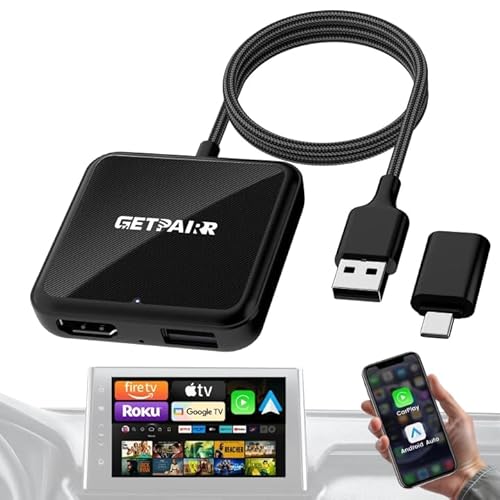
The GETPAIRR Pro Max merges Wireless CarPlay, Android Auto, HDMI input, and screen mirroring into a single device. It enables fast auto-reconnect, stable wireless links, and a genuine plug-and-play experience for maps, music, and calls. With HDMI support, you can connect devices like a Fire TV Stick or a streaming box to your car’s display, letting you watch videos or mirror content. A hotspot or in-car Wi-Fi is required for online apps, as the car screen itself cannot run streaming apps independently.
Highlights include:
– Gen4 4-in-1 Car TV Mate Pro Max
– HDMI input for external streaming devices
– Screen mirroring with DP-Alt-Mode device support
– Easy operation without heavy configuration
TeckyGem 3-in-1 Car Play/Auto & HDMI Pro Max

TeckyGem’s 3-in-1 adapter integrates Wireless CarPlay, Android Auto, and HDMI input into a sleek, plug-and-play unit. It enables instant access to maps, music, and calls, while providing HDMI connections for Fire TV Sticks or game consoles so the car display can serve as a portable theater. The device supports easy switching between CarPlay/Android Auto and HDMI streaming; a hotspot or Wi-Fi is needed for online apps, and the setup emphasizes quick, wireless operation with clear instructions.
Notable aspects:
– All-in-one wireless CarPlay/Android Auto plus HDMI
– Quick pairing and auto-reconnect
– Suitable for 2016+ vehicles with simple wiring
– External streaming device required for apps
WONNIE 13.3″ Car TV Headrest Monitor

The WONNIE 13.3″ headrest monitor delivers a larger viewing area ideal for backseat passengers. It supports 4K Android content, HDMI input, and Wi-Fi connectivity for streaming and mirroring. The dual-screen configuration and responsive touch screen enable family-friendly entertainment on long drives. While primarily a headrest system, its HDMI input allows you to connect streaming devices for on-the-road movies and shows, making it a practical option for households that value a bigger display in the car.
Key points:
– 13.3″ HD IPS touchscreen with 1920×1200 resolution
– HDMI input and wireless mirroring via supported devices
– Android-based system with OTA updates
– Large screen ideal for backseat use
Buying Guide: Key Considerations For Car HDMI TV Solutions
- HDMI compatibility and device support: Confirm that the adapter or headrest monitor accepts HDMI input from common streaming devices (Fire TV, Chromecast, Nintendo Switch, etc.). Some units require an external power source and a hotspot for online content.
- Car connectivity and charging: Look for models that offer easy USB power, car charger compatibility, and low power consumption to avoid draining the vehicle battery.
- Wireless CarPlay/Android Auto integration: If you want seamless integration with your phone’s navigation and apps, prioritize devices that support Wireless CarPlay and Android Auto, with reliable auto-reconnect.
- Content options and limitations: HDMI devices enable streaming apps, gaming, and screen mirroring, but many devices do not run apps directly in the car. An external streaming device is often required, and online apps generally need in-car Wi-Fi or a hotspot.
- Display size and mounting: For backseat use, consider headrest monitors for a larger viewing area, while for front-seat setups a compact screen may be preferable to maintain view of the road. Mounting hardware and vehicle compatibility matter.
- Latency and video quality: HDMI setups can achieve up to 1080p or 2K streaming depending on the device. If gaming or fast-paced video is important, prioritize models with higher refresh rates and stable connections.
- Ease of use: Plug-and-play devices with automatic reconnection simplify daily use. On-screen menus and included manuals can reduce setup time and confusion.
- Safety and usage: Ensure that any screen placement does not distract the driver and adheres to local laws on in-car displays. Rear-seat entertainment should not block airbags or safety features.
When choosing, balance the need for wireless integration, HDMI streaming capability, display size, and ease of use. For households seeking simple installation and minimal wiring, a 3-in-1 wireless CarPlay/Android Auto plus HDMI adapter can offer the best blend of features. For families prioritizing backseat viewing, a larger headrest monitor with HDMI input provides an immersive experience.