Best Laptop Mounts for Cars: Stable on-the-Go Workstations
For professionals who work on the road, a reliable car laptop mount can turn a cramped ride into a productive mobile office. This guide highlights five top options designed for cars, trucks, and SUVs, focusing on stability, adjustability, and easy installation. Each product below is chosen for compatibility with a variety of vehicles and laptop sizes, plus features that help keep your device cool and secure while you drive.
| Product | Brand | Key Strength | Mount Type | Link |
|---|---|---|---|---|
| VIVO Single Laptop Car Mount | VIVO | Full articulation and adjustable pole for ergonomic positioning | Floor-seat bolt mounting | Amazon |
| MELIPRON Vehicle Laptop Mount | MELIPRON | No-drill installation with quick-release pole | Bolts to passenger seat rail | Amazon |
| SPIRRELAB Car Laptop Mount (2 Fans) | SPIRRELAB | Built-in cooling fans and durable aluminum | Bolts to seat area; adjustable clamps | Amazon |
| Mount-It! Car Laptop Mount | Mount-It! | Full motion with locking joints for stability | No-drill passenger seat rail | Amazon |
| Mobotron MS-526B Laptop Mount | Mobotron | Wide compatibility and complete adjustment | No drilling; seat rail mount | Amazon |
VIVO Single Laptop Car Mount
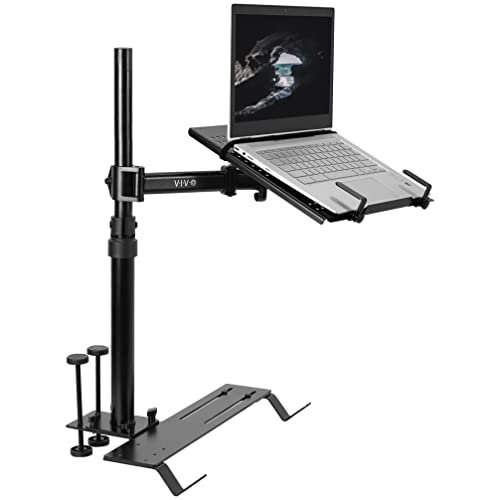
The VIVO MOUNT-CAR01 provides full desk-style movement with a telescoping pole and multiple seat bolt feet for compatibility with cars, trucks, vans, and SUVs. The 36 cm by 30 cm tray accommodates laptops up to 43 cm in size and supports up to 5 kg. A ventilated surface promotes airflow to reduce device heat, while flexible tray clips secure your laptop for secure transport. Adjustable tilt, swivel, rotation, and height ensure ergonomic alignment for long work sessions on the road.
MELIPRON Vehicle Laptop Mount

The MELIPRON laptop mount emphasizes ergonomic comfort with adjustable height, tilt, and a 360° swivel for optimal viewing. It installs without drilling by mounting to the passenger seat rail bolts, preserving vehicle integrity. A quick-release telescopic pole allows easy removal when not in use, keeping the passenger area open for others and reducing clutter on shared vehicles.
SPIRRELAB Car Laptop Mount with 2 Cooling Fans

SPIRRELAB’s car laptop mount features two built-in USB cooling fans to dissipate heat, preventing overheating during extended use. Its triangular base formed by two base mounting points and riser bases distributes load evenly for stability on rough roads. It supports laptops and tablets from 9″ to 17″ and includes extra stabilization straps. The main body is aluminum with a strong plastic tray, designed to endure demanding road conditions and heavy devices.
Mount-It! Car Laptop Mount

Mount-It! offers a no-drill installation that clamps to the passenger seat rail, combined with a full-motion design for precise laptop placement. Joints with locking teeth help keep the setup stable during driving. The tray supports most laptops up to 17 inches and can also hold tablets. This model emphasizes simplicity and reliability for both commercial fleets and personal vehicles, ensuring secure, adjustable performance.
Mobotron MS-526B Heavy Duty Laptop Mount

The Mobotron MS-526B is a heavy-duty option designed for cars, trucks, and SUVs, featuring a no-drill mounting approach and wide adjustment capabilities. It supports laptops and tablets with flexible vertical and horizontal tray movements, holding devices securely even during movement. This model emphasizes robust construction and reliable performance for frequent travelers and professional drivers alike.
Buying Guide: Key Purchase Considerations
- Vehicle compatibility: Check mounting method and bolt positions (seat rails vs. floor bolts) to ensure a secure fit for your car, truck, or SUV. Some models require no drilling, preserving vehicle integrity.
- Laptop size and weight support: Verify maximum supported screen size and weight. Most car mounts handle 9″–17″ laptops and tablets, but always confirm your device dimensions.
- Stability and cooling: Look for bases with multiple mounting points and sturdy materials. For devices prone to overheating, built-in cooling fans or heat-dissipation features are beneficial.
- Adjustability: Ergonomic flexibility matters for long trips. Consider tilt, swivel, rotation, and a telescoping pole range to achieve a comfortable workstation setup.
- Ease of installation and removal: Quick-release poles, tool-free assembly, and simple disassembly are advantageous for shared vehicles or varying daily needs.
- Build quality and durability: Aluminum components and robust clamps contribute to longevity in rough road conditions and frequent use.
- Security features: Look for clamps, straps, or locking mechanisms that reduce laptop movement and prevent accidental slipping during transit.
- Maintenance and cooling access: Ensure there is access for cooling, cable management, and easy removal when the vehicle’s interior space needs to be freed.
When selecting a car laptop mount, balance the number of installation options with how often you switch vehicles. For fleet use, no-drill installations and quick-release poles can save time. For personal use, heavier-duty aluminum mounts with cooling features may extend device life on long trips. Always confirm the mounting surface is accessible and free of obstructions before installation.