Best Bluetooth OBDII Scan Tool for Fast Car Diagnostics
Finding a reliable Bluetooth OBDII scan tool helps you read engine codes, monitor live data, and diagnose issues without a trip to the shop. This guide highlights five top options that work with iOS and Android, covering both consumer-friendly readers and more advanced diagnostic tools. Each product supports standard OBD-II functions such as reading and clearing codes, viewing live sensor data, and testing readiness. Compare compatibility, app requirements, and data accessibility to choose the best fit for your vehicle and tech setup.
| Product | Brand | Key Strength | Typical Use |
|---|---|---|---|
| BlueDriver Bluetooth Pro OBDII Scan Tool | BlueDriver | ||
| Veepeak OBDCheck BLE+ Bluetooth OBD II Scanner | Veepeak | General diagnostics with app flexibility | |
| Panlong OBD2 Scanner Bluetooth | Panlong | Smartphone-based fault code reading | |
| ANCEL AD310 Classic Enhanced OBD II Scanner | ANCEL | DIY diagnostics and quick checks | |
| OBD2 Scanner Reader Bluetooth Wireless (UMEIJA) | UMEIJA | In-depth diagnostics on multiple protocols |
BlueDriver Bluetooth Pro OBDII Scan Tool
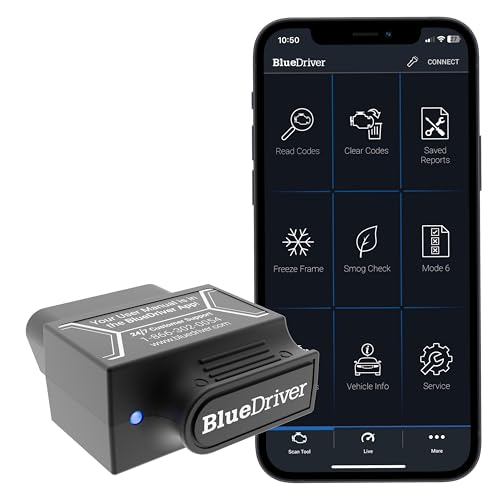
BlueDriver positions itself as a professional-grade diagnostic tool for consumer vehicles. It pairs with iPhone and Android devices to read and clear engine codes, ABS, SRS, airbag, and other systems. The tool emphasizes actionable repair information, offering unlimited repair reports with possible fixes and live data monitoring while driving. This makes it a strong option for daily drivers and DIY enthusiasts who want dealer-level insights without ongoing subscription costs.
Veepeak OBDCheck BLE Bluetooth OBD II Scanner

This device supports Bluetooth LE and Classic on Android, with optional BLE use on iOS. It provides standard OBD-II functions such as reading and clearing codes, viewing freeze frame data, and live sensor data. The description notes app-dependent support for advanced features and EVs, so users should verify compatibility with their preferred diagnostic app before purchase. It’s a flexible option for users who want a lightweight, Bluetooth-based scan tool with broad device support.
Panlong OBD2 Scanner Bluetooth

Panlong’s OBD2 scanner turns a smartphone into a professional-grade diagnostic tool. It supports reading and erasing codes, live data, I/M readiness tests, and freeze-frame data. The description emphasizes affordability and DIY repair assistance, suggesting it’s a practical entry point for users who want to determine the severity of issues and decide whether to repair themselves or seek professional help. Some features may require specific third-party apps for full access.
ANCEL AD310 Classic Enhanced OBD II Scanner
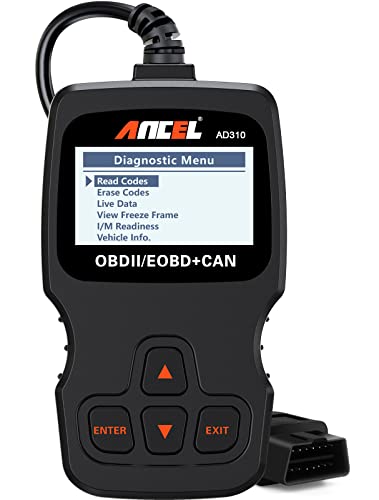
ANCEL AD310 is a compact, budget-friendly OBD-II scanner designed for quick checks. It reads and clears emission-related trouble codes, shows live data, reads freeze frame information, and indicates readiness for I/M testing. Its straightforward interface, reliable build, and portability make it popular for home mechanics and everyday users who want fast feedback on common emissions and engine issues without complex setup.
UMEIJA OBD2 Scanner Reader Bluetooth

UMEIJA’s reader emphasizes an all-in-one diagnostic experience, including 9 supported protocols, live data streaming, VIN retrieval, and diagnostic reports. It supports a range of app ecosystems and offers data visualization to help users interpret results. Given its broad feature set, it’s suitable for users who want more in-depth insights and a robust data presentation alongside standard OBD-II functions.
Buying Guide: Key Purchase Considerations
When selecting a Bluetooth OBDII scan tool, consider these factors to align with your vehicle, device, and learning curve:
- Compatibility: Check vehicle year, make, model, and whether your phone OS (iOS or Android) is supported. Some tools work best with specific apps; verify app availability and device pairing requirements (BLE vs. Classic Bluetooth).
- Data Access: Decide if you mainly need code reading/clearing or if you want advanced features like live data, freeze frame, I/M readiness, EV/HEV support, and repair guidance.
- App Ecosystem: Assess the companion apps’ interface, data visualization, update frequency, and reliability. A strong app can unlock deeper insights and easier interpretation of results.
- Ease of Use: For beginners, a simple setup and intuitive menus reduce frustration. For enthusiasts, look for richer data presentation and customizable dashboards.
- Reliability and Durability: A compact device should withstand daily handling. Consider device build quality, cable length, and plug-in stability.
- Cost of Ownership: Some tools offer free basic diagnostics but charge for premium reports or ongoing features. Budget for potential app purchase requirements if needed.
- Vehicle Coverage: While most tools cover 1996+ OBD-II vehicles, some diesel or specialty vehicles may have limited support. Verify the tool’s compatibility with your specific engine and emission system.
- Safety and Privacy: Ensure the device connects securely and that you’re comfortable with any data-sharing practices the app may implement.
Across these options, the BlueDriver stands out for professional-grade reports and continuous diagnostics, while Veepeak, Panlong, and UMEIJA provide versatile, cost-conscious choices with broad app support. ANCEL AD310 offers a straightforward, dependable experience for quick checks, and the Panlong and similar readers are accessible entry points for new users exploring DIY car care.
For best results, identify your priority—comprehensive repair guidance, real-time monitoring, or budget-friendly basic diagnostics—and confirm the app’s capability to access the data you care about. Always ensure your vehicle and device are compatible before purchasing.