Best Heads-Up Display (HUD) Systems for Cars: Clear, Safe Driving Data on Your Windshield
Heads-up displays (HUDs) project essential driving metrics—such as speed, RPM, compass, and alerts—onto your windshield. This guide reviews top HUD options currently available on Amazon, focusing on reliability, screen readability, and ease of installation. Whether you drive a compact sedan or a heavy-duty truck, these devices aim to minimize dashboard glances and maximize safety through bright, legible information.
Summary of selected products:
| Product | Brand | Key Benefit | Signal & Display Type |
|---|---|---|---|
| Heads up Display for Cars, Car HUD, Digital GPS HUD Speedometer, USB Cable Plug and Play, Automatic Brightness Adjustment, Large Font Display (K1-White) | KUOWEIHUD | High brightness with automatic dimming; easy USB install | GPS+BDS, 10 Hz refresh |
| KUOWEIHUD Heads up Display for Cars, Car HUD, Digital GPS HUD Speedometer, USB Cable Plug and Play, Automatic Brightness Adjustment, Large Font Display | KUOWEIHUD | Plug-and-play installation; clear, large font | GPS+BDS, 10 Hz refresh |
| wiiyii OBD2 Gauge Display Heads up Display P6 | wiiyii | OBD2 data alongside GPS; versatile mounting | OBD2+GPS |
| KUOWEIHUD Heads up Display for Cars, Car HUD, Car Speedometer Display | KUOWEIHUD | Speed alerts and auto brightness | GPS+BDS, 10 Hz refresh |
| AZIJYV Heads Up Display for Cars, M1 Green | AZIJYV | Simple windshield projection with driving direction | GPS |
KUOWEIHUD K1-White HUD With Large Font Display

The KUOWEIHUD K1-White HUD emphasizes robust satellite reception and automatic brightness control. It uses a dual-mode GPS+BDS chipset to achieve fast data updates and supports up to 32 satellites for stable speed readings in diverse locales. The device automatically adjusts brightness based on ambient lighting, ensuring high legibility from dawn to dusk. Its USB-powered, plug-and-play design makes installation straightforward for most cars, motorcycles, and trucks with a standard USB port. The combination of reliable signal reception and adaptive brightness contributes to safer driving by reducing the need to look away from the road.
KUOWEIHUD Large Font GPS HUD (Second Model)

This KUOWEIHUD unit mirrors the first model’s emphasis on rapid satellite acquisition and viewer comfort. The automatic brightness feature ensures legibility across daylight and night driving, reducing glare and eye fatigue. With a simple USB plug-and-play setup, installation is designed to be non-destructive and compatible with a wide range of vehicles that rely on USB power. The HUD’s design centers on delivering critical speed and navigation cues without clutter, which can help drivers maintain focus on road conditions.
wiiyii OBD2 Gauge Display Heads Up P6
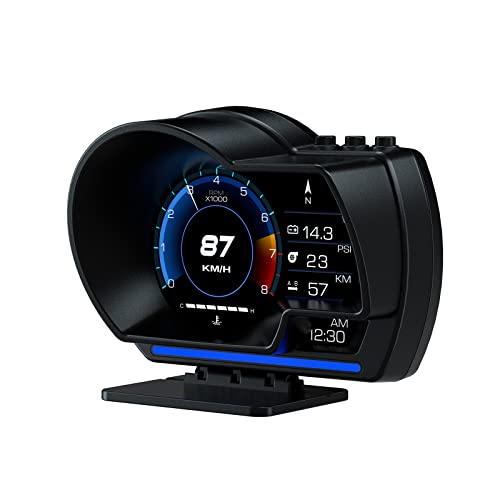
The wiiyii P6 HUD integrates OBD2 data with GPS-driven speed information, delivering a broader data set for drivers who want more than speed alone. It supports a dashboard-ready interface that can reduce the need for glancing away from the road. The device can be installed with an adjustable bracket for dashboard or windshield mounting, offering placement flexibility. A variety of interface options, including multiple display modes, helps drivers tailor the presentation of data to their preferences while staying within a non-distracting field of vision.
KUOWEIHUD Auto Brightness HUD With Speed Alerts

This KUOWEIHUD model highlights continuous speed monitoring with automatic brightness adjustment. The device is designed for universal USB port compatibility and features a speed alert system to warn drivers when exceeding pre-set limits. The combination of intelligent brightness control and alert capabilities supports safer driving by keeping important data visible without becoming intrusive. Installation remains plug-and-play, with emphasis on compatibility across a wide range of vehicle types, from compact cars to larger commercial vehicles.
AZIJYV M1 Green Heads-Up Display

AZIJYV’s M1 Green HUD presents a minimalist windshield projection focused on essential metrics, with a simple white display that minimizes visual clutter. The design emphasizes clear speed representation and a GPS-driven compass for directional awareness. It is built for quick, plug-and-play installation and can display speed in both MPH and KM/H, which is useful for drivers who travel across regions with different units. The speedometer display is intentionally unobtrusive to avoid obstructing the driver’s field of view while delivering timely alerts when speeding or fatigue signs are detected.
Buying Guide: Key Considerations For Choosing A HUD
When selecting a heads-up display for your vehicle, consider a range of factors to ensure you pick a model that fits your needs and driving habits. This guide covers multiple perspectives, including data presentation, installation, compatibility, and safety features.
- Display clarity and brightness: Look for auto-brightness or adjustable brightness to maintain legibility in bright sunlight and at night. A large font improves readability without requiring a long glance away from the road.
- Signal reception and data sources: HUDs that combine GPS with additional signals (GPS+BDS or GLONASS) tend to provide more stable speed readings, especially in urban canyons or remote areas. A high refresh rate (e.g., 10 Hz) reduces data lag.
- Power and installation: Plug-and-play USB-powered units are easiest to install and typically non-destructive to dashboards. Check for compatibility with a wide range of vehicles, including cars, motorcycles, and trucks.
- Display modes and alerts: Multi-interface options let you customize the look and feel of the data. Speed alerts and fatigue warnings can contribute to safer driving by providing timely reminders about speed and alertness.
- OBD2 compatibility: If you want richer data sets, models that support OBD2 (for vehicle diagnostics) can display engine and fault codes beyond simple speed data. Ensure your vehicle’s OBD2 protocol aligns with the HUD’s capabilities.
- Mounting flexibility: Dashboard versus windshield mounting offers different viewing angles and accessibility. Adjustable brackets improve comfort and reduce glare.
- Durability and warranty: Consider models with reliable customer support and warranty coverage in case data readings drift or hardware components fail.
Practical usage considerations
HUDs are most effective when they align with natural driving scenarios. In city traffic, a compact, legible display with subtle alerts helps maintain awareness without distraction. On highways or long trips, a clear speedo, RPM, and directional cues can reduce cognitive load over time. For drivers who regularly switch vehicles, plug-and-play models with universal USB power are especially convenient. If you rely on OBD2 for additional metrics, ensure the HUD’s data integration remains accurate and responsive without conflicting signals.
To maximize safety, pair a HUD with cautious driving habits and regular vehicle maintenance. Calibrating displays to your preferred brightness and ensuring the device is securely mounted will help prevent data from shifting during sharp turns or sudden stops. Finally, verify compatibility with your vehicle’s electrical system and confirm the HUD supports your unit measurements (MPH vs. KMH) to avoid misinterpretation of the displayed data.