Best Car WiFi Box: Top Wireless CarPlay & Android Auto Adapters
Fuel your car’s infotainment with a modern wireless CarPlay or Android Auto experience. The following picks highlight devices that add 4K video support, AI features, dual-band WiFi, and plug-and-play setup. This guide compares performance, compatibility, and multimedia capabilities to help you choose the best car WiFi box for your needs.
The table below summarizes five standout options, focusing on system flexibility, app access, and connectivity. Use it as a quick reference when browsing product pages.
| Product | OS/Platform | Connectivity | Storage |
|---|---|---|---|
| FAIMEE AI Box | Android 12 | Dual-Band WiFi, Bluetooth 5.0 | 32GB ROM |
| ZYW AI Box | Android 10/AI Box hybrid | WiFi 6, Bluetooth | 32GB |
| LAMTTO 4-in-1 | Android with Google Play | WiFi + Bluetooth | 32GB (expandable via Google Play) |
| OneCarStereo AI Box HE Pro | Android 13 | Dual WiFi, 4G option | 8+128GB |
| ATOTOOUT CB6D | Android 13 | 4G LTE, Wi‑Fi | 8+128GB |
FAIMEE AI Box Wireless CarPlay & Android Auto Adapter

The FAIMEE AI Box upgrades wired CarPlay to wireless CarPlay and Android Auto, removing the need for cables. It runs on Android 12 with 4GB RAM and 32GB ROM, supporting dual‑band WiFi (2.4GHz/5GHz) and Bluetooth 5.0. It is designed to work with factory CarPlay and Android Auto systems and supports streaming apps and 4K video playback. The device emphasizes seamless pairing, stable connectivity, and media flexibility via USB drives and SD cards up to 128GB. This model targets users seeking a straightforward plug‑and‑play upgrade with broad app compatibility.
Key considerations: verify your vehicle compatibility with wired CarPlay, ensure your phone OS matches the adapter’s support, and check that you have a reliable in‑car WiFi signal for streaming. Performance benefits include faster pairings, smoother navigation, and improved media availability on the go.
ZYW Magic AI Box Wireless CarPlay Adapter

Designed for vehicles with factory wired CarPlay or Android Auto, the ZYW AI Box delivers lag‑free 4K streaming using WiFi 6. It features robust thermal design for temperature resilience and operates in a wide temperature range (-20°C to 60°C). This model runs on an Android base with 32GB storage and supports YouTube, Netflix, and other apps, encouraging a cinematic in‑car experience. Before purchasing, confirm that your vehicle’s built‑in wired CarPlay is compatible to ensure a smooth plug‑and‑play installation.
Considerations include verifying compatibility with your car’s OEM system, the need for WiFi for streaming, and potential limits on some apps due to DRM or device policy. The device aims to balance performance with reliability, especially in varying climates and road conditions.
LAMTTO 4-in-1 Wireless CarPlay Android Auto Adapter

LAMTTO delivers a 4‑in‑1 solution with wireless CarPlay and Android Auto, plus access to Google Play for app downloads. The AI Magic Box comes preloaded with popular streaming apps like Netflix, YouTube, TikTok, and more, and includes a remote for front or rear seating control. It runs on Android with 32GB storage and supports additional apps via Google Play, enabling a flexible multimedia hub. The remote control adds convenience for backseat passengers while driving.
Potential drawbacks include remote functionality limitations with certain apps due to permissions and app policies. Users should consider whether remote control will be valuable given passenger usage patterns and whether the vehicle’s head unit supports full remote streaming without interruption.
OneCarStereo AI Box HE Pro
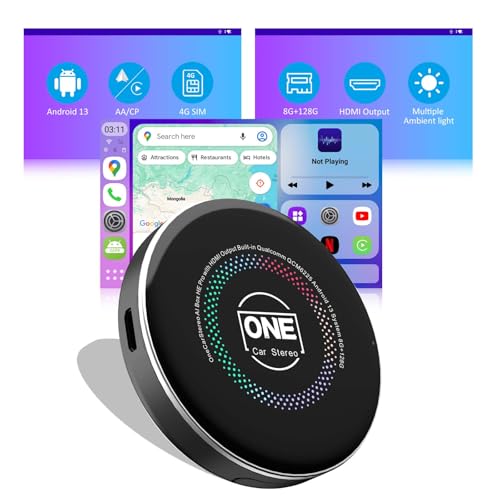
The OneCarStereo HE Pro runs on an Android 13 OS with a Qualcomm octa‑core 6225 chip, delivering swift app loading and multi‑tasking. It supports wireless CarPlay and Android Auto, with the option to connect via a SIM card for 4G and in‑car Wi-Fi. The device enables video output to rear displays and wireless screen mirroring for iPhone and Android devices. It emphasizes OTA updates and broad app compatibility, including streaming services and navigation tools.
Important notes include confirming vehicle compatibility (2016+ with wired CarPlay) and understanding any limitations on app video output due to platform rules. This model targets users seeking high performance, expanded connectivity, and the ability to run multiple apps on the go.
ATOTOOUT CB6D Magic Box

ATOTOOUT CB6D offers Android 13 with wireless CarPlay and Android Auto, plus builtin 4G, Wi‑Fi, dual Bluetooth, and 8GB RAM with 128GB storage. It includes built‑in GPS, OTA updates, and microSD playback, delivering extensive offline and online capabilities. This device blends media playback, navigation, and app access in a single box, aiming for a robust and expandable in‑car entertainment system. Compatibility notes should be checked to ensure your vehicle supports wired CarPlay and that cellular connectivity is available where you drive.
Considerations include the breadth of built‑in features versus the necessity of a stable data plan for 4G use, and the balance between on‑device storage and cloud streaming. The CB6D is positioned for drivers wanting a comprehensive upgrade with several connectivity options and future‑proofing features.
Buying Guide: Key Considerations for Choosing a Car WiFi Box
- Compatibility: Confirm that the device supports wired CarPlay or Android Auto in your vehicle, and verify any model‑specific caveats or exclusions.
- Operating System and App Access: Android 12/13 options with Google Play access enable a broad app library. Consider whether preloaded apps cover your needs or if you’ll install more after purchase.
- Connectivity: Dual‑band WiFi (2.4GHz/5GHz), WiFi 6, and optional 4G/LTE provide different streaming reliability. Evaluate your typical driving environment and data availability.
- Storage and Expandability: 32GB or more is common, with microSD or USB drives supporting offline media. Check for RAM capacity to ensure responsive navigation and media playback.
- Video Quality and Output: 4K support and HDMI or screen mirroring expand multimedia options. Consider whether rear‑seat display output is important for passengers.
- Remote Control and Ease of Use: Some models offer remotes or voice/AI assistants. Determine if this aligns with your preferred control method and safety considerations.
- Safety and Privacy: Some features require network access. Ensure that privacy settings and safe‑driving modes (like video lock during driving) fit your needs.
- OTA Updates: Devices with over‑the‑air updates can stay current with features and security patches. Confirm update frequency and how it impacts usage.
- Installation and Fit: Plug‑and‑play designs save time, but verify that your dashboard layout and ports are compatible with the unit’s size and mounting options.